





ego (lite) n’est qu’un navigateur ; ego est votre agent personnel sur tous vos appareils.
Rejoindre la liste d'attente
ego lite vs Browser Harness

The Best Browser Harness Alternative

Browser Harness is Browser Use's local version: a Python agent loop you run on your own machine with your own LLM API key, launching its own browser and calling the model again at every step to plan the next move.

ego lite needs no framework: the coding agent you already run drives your real, logged-in browser directly, batching actions instead of narrating them one at a time. Across 31 live-site jobs it finishes 96.8% of tasks with a perfect score to Browser Harness's 83.9%, on 41% fewer model round trips.

Utilisé par des développeurs de
GoogleAmazonShopifyTikTokHarvardStanfordUSCUCLA

Browser automation benchmark: ego lite vs Browser Harness

This is live browser automation, not a sandbox demo. ego lite and Browser Harness, Browser Use's local version, ran the same 31 multi-step tasks on real websites: several pages, several decisions, often a login you already have. The hosted cloud product was not part of this run. Local against local, same jobs, scored the same way.

agent: pimodel: ChatGPT 5.6 Solthinking: max31 tasks

Task completion rate

How often the agent finished the job. Stuck at login, skipped a step, or returned the wrong result: that task is a fail. Higher is better.

ego lite96.8%30 of 31 tasks perfect
Browser Harness (Browser Use local version)83.9%26 of 31 tasks perfect

Cost per completed task

What one finished job costs in model spend. Failures still get billed, so they push this number up. Lower is better.

ego lite$1.98
Browser Harness (Browser Use local version)$3.04

Model turns per task

How many times the model had to look at the page and choose the next action. Extra looks mean extra tokens, extra waiting, and extra places to stall. Lower is better.

ego lite30.3
Browser Harness (Browser Use local version)51.2

Average task time

How long a job took from start to finish, on average, including time spent waiting on the model. Lower is better.

ego lite8m 38s
Browser Harness (Browser Use local version)9m 58s

We ran every tool twice and kept the better score. A failed task still counts against it.

Check the numbers, or rerun the tasks yourselfThe 31 tasks, the grading checklists, and the raw results are open source. If a number looks off, open the repo.ego-browser-benchmark-framework

Why ego lite is better than Browser Harness

With Browser Harness, the browser agent is something you build: a Python project, an LLM API key, a loop that calls the model every step. With ego lite, it's something you already have. Run /ego-browser inside Claude Code, Codex, or Cursor and your agent gets your actual browser, logins and all. (Browser Use's hosted cloud product is a different category; the local-versus-local matchup is this page.)

96.8% of tasks done perfectly. No other tool tops 84%.

Browser Harness's agent loop calls the LLM at every step: read the page, decide the next batch of actions, wait, repeat. It turned in the most careful runs of any competitor on those 31 jobs, and paid for the care in round trips: 51.2 model calls per task, the most of the five tools measured, each one re-sending page state just to plan the next few clicks.

In ego lite, every page reaches your agent as a compressed Snapshot it can act on immediately, several actions per JavaScript turn, no separate model loop deciding a step at a time. The result on the same 31 tasks: 96.8% perfect to Browser Harness's 83.9%, on 41% fewer round trips and 35% less model spend per completed task.

Time to finish a task, shorter is better
518 sego (lite)
598 sbrowser harness
Data source - Task: finish an average live-site job
Multitâche parallèle, exécution plus rapide

Browser Use's own docs mark parallel Browser Harness runs experimental: developers note agents can conflict when they share resources, and real isolation means standing up a separate browser instance per task yourself.

Dans ego lite, il n'y a aucune limite sur les Spaces : chacun exécute sa propre tâche à la fois, sur son propre profil Chrome importé. Aucun ne vous vole votre onglet, et vous pouvez observer ou reprendre la main sur n'importe quel Space à tout moment.

Fini les allers-retours Moins de jetons consommés

Browser Harness's loop calls the model at every step and carries the page state along, and on longer tasks that cost compounds fast enough that users ask the Browser Use maintainers how to avoid burning tokens on a task that runs the same way every time.

Votre agent dans ego lite regroupe plusieurs actions en quelques lignes de JavaScript par tour, au lieu d'attendre un nouvel appel au modèle pour continuer. Combiné à l'entrée Snapshot, la même tâche se termine avec beaucoup moins de jetons au total.

Claude Code · ego lite
>/ego-browser Add the first product to the cart, then check checkout loads
Bash(
ego-browser nodejs <<'EOF' await openOrReuseTab('localhost:3000') await click('.product-card') await click('.add-to-cart') await click('a[href="/checkout"]') cliLog('checkout loaded') EOF
)
Output:
[t=4480ms] checkout loaded
Done. Both steps work.
─── 1 tool call · 1.1k tokens ───
Browser Harness · agent.run()
>$ python run_task.py 🎯 Task: Add the first product to the cart, then check checkout loads
📍 Step 1:
👍 Eval: Page loaded successfully
🧠 Memory: On demo store homepage, need to find a product
🎯 Next goal: Open first product and add it to cart
📍 Step 1: Ran 3 actions in 2.1s: ✅ 3
3.4k tokens sent so far
📍 Step 2:
👍 Eval: Product added to cart
🧠 Memory: Item in cart, now check checkout
🎯 Next goal: Navigate to checkout and confirm it loads
📍 Step 2: Ran 2 actions in 1.9s: ✅ 2
7.1k tokens sent so far
📍 Step 3:
👍 Eval: Checkout page did not load on first click
🧠 Memory: Link required a second click, retrying
🎯 Next goal: Retry the checkout link and wait for the form
📍 Step 3: Ran 1 action in 2.3s: ✅ 1
10.8k tokens sent so far
📍 Step 4:
👍 Eval: Payment form is present
🧠 Memory: Task complete
🎯 Next goal: done
📍 Step 4: Ran 1 action in 1.4s: ✅ 1
13.6k tokens sent so far
─── 4 model calls · 13.6k tokens ───
The same task, the same model. Left: one batched JavaScript call in ego lite, 1.1k tokens total. Right: Browser Harness's agent loop, a fresh model call per step, tokens climb to 13.6k.

Le même Chrome, natif pour les agents

Browser Harness launches its own Chromium over the DevTools protocol, and the Browser Use GitHub issues are full of developers hitting profile-lock errors pointing it at their real Chrome: the --profile flag copies the live profile into a temp directory, and on Windows that copy fails outright while Chrome holds the file locks.

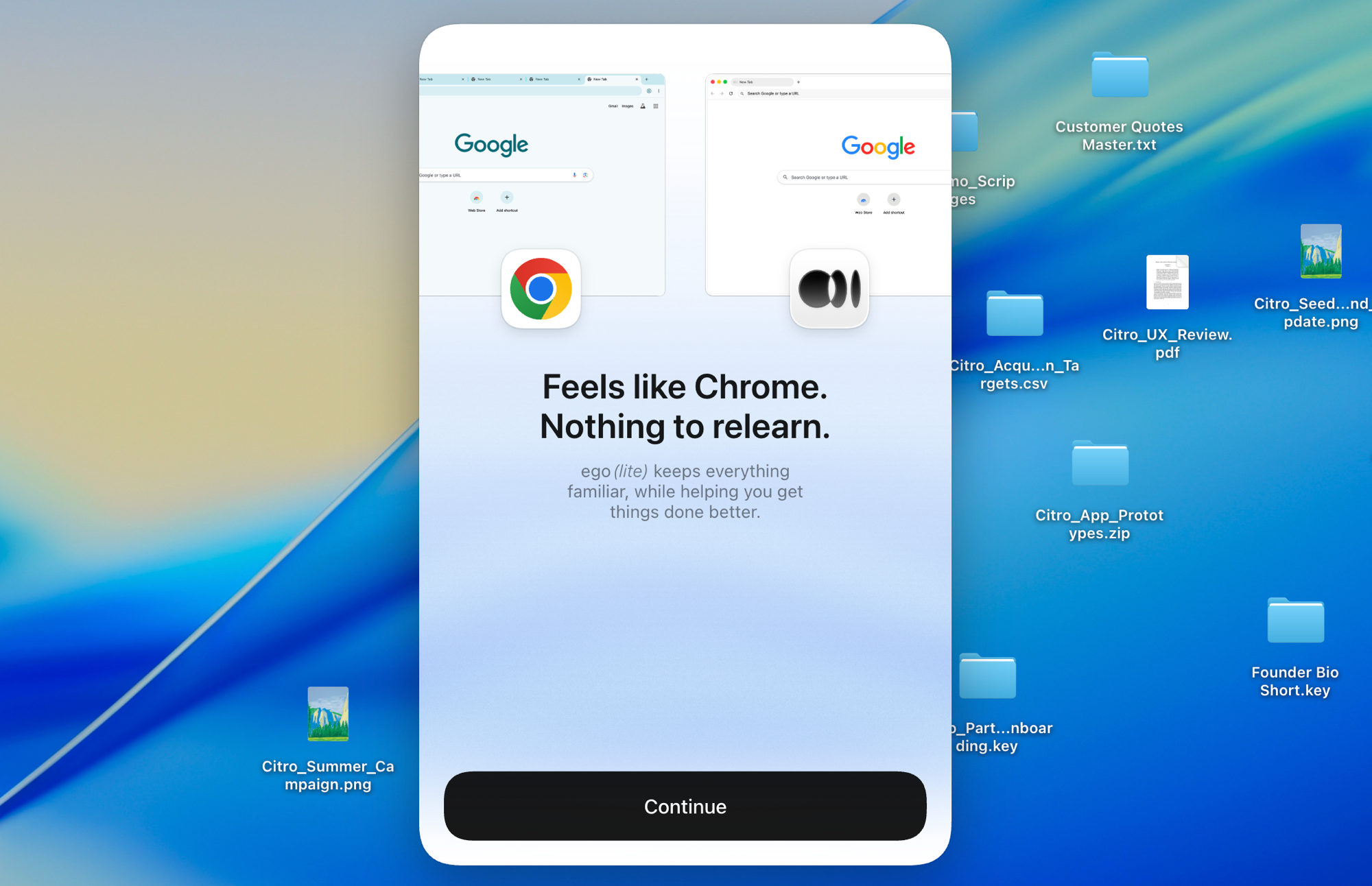
Construit sur Chromium, ego lite importe toute votre configuration Chrome en un clic, à chaud, sans rien à fermer au préalable. Vos agents héritent de vraies connexions sans jamais rester bloqués.

Import du profil Chrome dans ego lite : configuration en un clic avec toutes vos connexions

ego lite vs Browser Harness

Feature comparison between ego lite and Browser Harness.
Fonctionnalitéego liteBrowser Harness
Qui fournit le modèleVotre agent de code (Claude Code, Codex, Cursor)Vous, en apportant une clé API LLM et en payant par jeton
ConfigurationInstallez l'application, exécutez /ego-browser dans votre agentProjet Python, pip install, configuration du modèle, code de la tâche
Sites déjà connectés (SSO, 2FA)Import du profil Chrome en un clic, connecté par défautChromium lancé séparément ; la réutilisation du profil est manuelle, avec des réserves
Comment les actions s'exécutentPlusieurs actions regroupées par tour en JavaScriptLa boucle d'agent appelle le modèle à chaque étape
Coût en jetons par tâchePlus faible : entrée Snapshot associée à des actions groupées, mesuré par tâchePlus élevé : chaque étape renvoie l'état de la page au modèle
Browser automation on live sites (31 tasks, same model)96.8% perfect, $1.98 per completed task, 30.3 round trips83.9% perfect, $3.04 per completed task, 51.2 round trips
Tâches en parallèleLes Spaces isolent les tâches dans un seul navigateur visibleExpérimental ; plusieurs instances d'agent, ou le cloud payant
Sert aussi de navigateur au quotidienOui, vous naviguez dans votre Space, les agents travaillent dans le leurNon, une bibliothèque d'automatisation et des navigateurs hébergés
Compétences réutilisables (bientôt disponible)Distille les exécutions réussies en compétences réutilisables ; jusqu'à 5 fois plus rapide sur des tâches complexes à mesure que l'agent les répète (bêta limitée)Aucun équivalent intégré
PrixGratuit, sans abonnementOpen source gratuit ; l'utilisation du cloud et du LLM sont payantes
Dernière mise à jour 20 août 2026

Une transition en douceur

If you set up Browser Harness to automate your own browsing (research, form filling, logged-in chores) rather than to ship a product, the switch removes the whole project layer.

  1. Télécharger ego (lite)

    Download ego lite and import your Chrome profile in one click. The logins you were configuring Browser Harness to reach come along automatically.

  2. Lancez votre première tâche avec /ego-browser

    Collez dans votre agent

    /ego-browser Ouvrez ego.app et rejoignez la liste d'attente

    Exécutez /ego-browser dans Claude Code, Codex ou Cursor. Aucun environnement Python, aucune sélection de modèle, aucune clé API.

  3. Regardez-le travailler
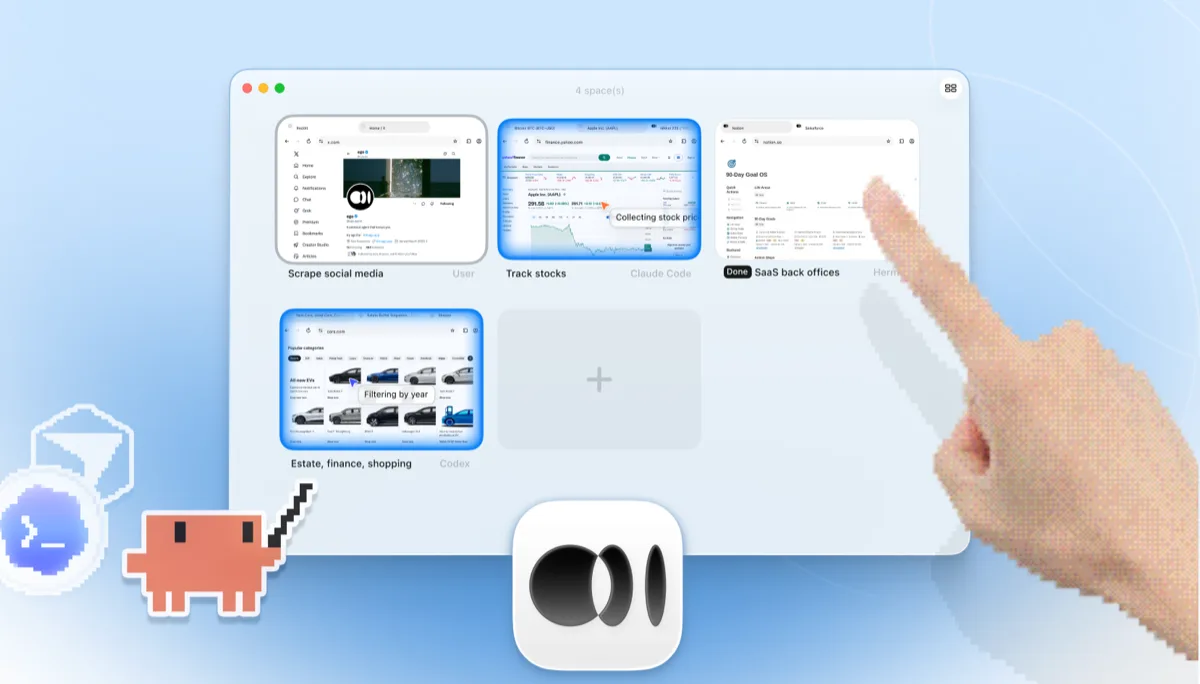
    Vue d'ensemble des Spaces ego lite avec quatre tâches de navigateur exécutées côte à côte : Claude Code suivant l'action Apple sur Yahoo Finance, Codex filtrant des voitures par année sur cars.com, Hermes terminant une tâche de back-office SaaS, un utilisateur scrapant X, et une main appuyant sur + pour ouvrir un autre Space

    La tâche s'exécute dans son propre Space, et non dans une instance Chromium headless que vous ne pouvez que deviner à partir de logs. Regardez-la en direct ou reprenez la main à tout moment, et le résultat revient dans le CLI de votre agent.

Keep Browser Harness where it belongs: inside Python products and pipelines you're building for others. ego lite covers the agent browsing you do yourself.

Quand utiliser chaque outil

Choisissez ego (lite) quand

  • Vous voulez qu'un agent effectue votre propre travail de navigateur (recherche, formulaires, tâches sur des comptes connectés) sans rien construire en Python.
  • Vous utilisez déjà Claude Code, Codex ou Cursor et ne voulez pas d'une deuxième boucle d'agent avec sa propre facture de clé API.
  • Les tâches nécessitent vos vraies connexions : l'import de profil en un clic l'emporte sur la configuration manuelle du profil Chromium.
  • Vous voulez que les tâches s'exécutent dans des Spaces parallèles, dans un navigateur visible que vous pouvez observer ou reprendre en main.

Choose Browser Harness when

  • You're building a custom automation product or pipeline in Python. Browser Harness is a library designed to be embedded.
  • Vous voulez maîtriser la boucle d'agent dans votre propre code : choisir le modèle, façonner les prompts, contrôler chaque étape.
  • You need automations deployed to the cloud, running on Browser Use's hosted browsers when your laptop is closed.
  • Vous livrez de l'automatisation de navigateur à d'autres. ego lite est un navigateur destiné à l'utilisateur final, pas un SDK.

Donnez à votre agent un vrai navigateur

Gratuit, fonctionne sur votre Mac, importe votre profil Chrome en un clic. Compatible avec Claude Code, Codex, Cursor et tout agent CLI qui écrit du code.

Still weighing your options? See how Browser Harness compares with the other tools in the same space.

FAQ

Browser Harness is Browser Use's local version. Browser Use is one of the most popular open-source AI browser agent projects: an MIT-licensed Python agent loop that lets an LLM control a browser, launching its own Chromium over the DevTools protocol and deciding actions step by step against the page state. You bring your own model API key and run it on your own machine. Browser Use's paid cloud product runs hosted browser agents with stealth and captcha-solving features, which is a different category from a local browser, so this page compares the harness: local against local. For developers building custom automation products and pipelines in Python, it's a strong, actively developed foundation, and of the five local tools we measured it posted the best completion rate of any competitor.

If you want an agent to do browser work for you, yes. ego lite plugs your existing coding agent into your real logged-in browser with no Python project and no API-key billing, and across 31 live-site jobs it finished 96.8% of tasks perfectly to Browser Harness's 83.9%, at $1.98 per completed task against $3.04. If you're building a browser-automation product or pipeline in Python, Browser Use is the better fit: it's a library designed to be embedded, and ego lite isn't an SDK.

Browser Use is the project; Browser Harness is its local version, the open-source Python agent loop you run on your own machine with your own LLM API key. Browser Use also sells a cloud product that runs hosted browser agents on their infrastructure. ego lite is a local browser, so the apples-to-apples comparison on this page is against Browser Harness; if you're weighing hosted browser infrastructure, see our Browserbase page instead.

We ran both tools on the same 31 browser automation tasks on live websites, driven by the same pi agent with the same model (gpt-5.6-sol, thinking effort max) and graded by the same written checklist. Each tool keeps its better of two full runs, so a failed task still counts. ego lite finished 30 of 31 tasks perfectly (96.8%) at $1.98 per completed task on 30.3 model turns; Browser Harness finished 26 of 31 (83.9%) at $3.04 on 51.2 turns, the best completion rate of any competitor measured. Browser Use's hosted cloud product was not part of the run; the comparison is local against local. The tasks, the checklists, and the raw results are open source in the ego-browser-benchmark-framework repository on GitHub, so every number can be audited or reproduced.

Browser Harness can, with manual configuration, and it's a common source of friction. The --profile flag copies your live Chrome profile into a temp directory, and on Windows that copy fails outright while Chrome is running and holding file locks, so the workaround is closing Chrome first. Connecting to an already-running Chrome over CDP works too, but Chrome 136 and later blocks CDP on your default profile, so most setups end up on a separate, non-default one. In ego lite, the real profile is the starting point: one-click import of logins, cookies, sessions, and extensions, shared safely with your own browsing through separate Spaces.

Non. Il n'y a aucune boucle de modèle séparée à financer. L'intelligence provient de l'agent de code que vous utilisez déjà, qu'il s'agisse de Claude Code, Codex, Cursor, Gemini CLI ou OpenCode. ego lite lui-même est gratuit, sans abonnement.

Les deux sont des outils open source pour la navigation pilotée par LLM, mais Browser Use est un framework d'agent Python construit autour d'une boucle autonome, tandis que Stagehand est le SDK TypeScript-first de Browserbase, avec des primitives act/extract/observe pour une automatisation hybride code plus IA. Les deux privilégient le code : vous créez un projet et fournissez l'accès au modèle. Consultez notre page ego lite vs Stagehand pour ce volet de la comparaison.

Ils répondent à des couches différentes. Browser Use est le framework d'agent ; Browserbase est l'infrastructure de navigateurs cloud sur laquelle s'exécutent ces frameworks. Les équipes combinent souvent une bibliothèque d'agent avec des navigateurs hébergés pour une échelle de production, et c'est un vrai atout pour les flottes cloud. ego lite ne se situe à aucune de ces deux couches : c'est un navigateur local et visible pour le travail d'agent que vous effectuez sur votre propre machine, avec vos propres comptes.

Browser Harness's agent loop calls the model at every step, and each call carries a fresh serialized snapshot of the page just to plan the next batch of clicks. Users running recurring or long-horizon tasks have asked the maintainers how to cut that cost, since the same task run the same way still pays full model price every time. On those 31 jobs that loop averaged 51.2 model round trips per task, the most of the five tools measured, against ego lite's 30.3. ego lite reduces the round trips themselves: the agent batches several actions in one JavaScript execution and reads pages as compressed Snapshots, so the savings compound over a whole task.

Le shell ego-browser qui connecte les agents au navigateur est open source sous licence MIT. Le navigateur ego lite lui-même est une application gratuite pour macOS, sans abonnement, et vos données restent locales.