





ego (lite) è solo un browser; ego è il tuo agente personale su tutti i dispositivi.
Iscriviti alla lista d'attesa
ego lite vs Browser Harness

The Best Browser Harness Alternative

Browser Harness is Browser Use's local version: a Python agent loop you run on your own machine with your own LLM API key, launching its own browser and calling the model again at every step to plan the next move.

ego lite needs no framework: the coding agent you already run drives your real, logged-in browser directly, batching actions instead of narrating them one at a time. Across 31 live-site jobs it finishes 96.8% of tasks with a perfect score to Browser Harness's 83.9%, on 41% fewer model round trips.

Scelto da sviluppatori di
GoogleAmazonShopifyTikTokHarvardStanfordUSCUCLA

Browser automation benchmark: ego lite vs Browser Harness

This is live browser automation, not a sandbox demo. ego lite and Browser Harness, Browser Use's local version, ran the same 31 multi-step tasks on real websites: several pages, several decisions, often a login you already have. The hosted cloud product was not part of this run. Local against local, same jobs, scored the same way.

agent: pimodel: ChatGPT 5.6 Solthinking: max31 tasks

Task completion rate

How often the agent finished the job. Stuck at login, skipped a step, or returned the wrong result: that task is a fail. Higher is better.

ego lite96.8%30 of 31 tasks perfect
Browser Harness (Browser Use local version)83.9%26 of 31 tasks perfect

Cost per completed task

What one finished job costs in model spend. Failures still get billed, so they push this number up. Lower is better.

ego lite$1.98
Browser Harness (Browser Use local version)$3.04

Model turns per task

How many times the model had to look at the page and choose the next action. Extra looks mean extra tokens, extra waiting, and extra places to stall. Lower is better.

ego lite30.3
Browser Harness (Browser Use local version)51.2

Average task time

How long a job took from start to finish, on average, including time spent waiting on the model. Lower is better.

ego lite8m 38s
Browser Harness (Browser Use local version)9m 58s

We ran every tool twice and kept the better score. A failed task still counts against it.

Check the numbers, or rerun the tasks yourselfThe 31 tasks, the grading checklists, and the raw results are open source. If a number looks off, open the repo.ego-browser-benchmark-framework

Why ego lite is better than Browser Harness

With Browser Harness, the browser agent is something you build: a Python project, an LLM API key, a loop that calls the model every step. With ego lite, it's something you already have. Run /ego-browser inside Claude Code, Codex, or Cursor and your agent gets your actual browser, logins and all. (Browser Use's hosted cloud product is a different category; the local-versus-local matchup is this page.)

96.8% of tasks done perfectly. No other tool tops 84%.

Browser Harness's agent loop calls the LLM at every step: read the page, decide the next batch of actions, wait, repeat. It turned in the most careful runs of any competitor on those 31 jobs, and paid for the care in round trips: 51.2 model calls per task, the most of the five tools measured, each one re-sending page state just to plan the next few clicks.

In ego lite, every page reaches your agent as a compressed Snapshot it can act on immediately, several actions per JavaScript turn, no separate model loop deciding a step at a time. The result on the same 31 tasks: 96.8% perfect to Browser Harness's 83.9%, on 41% fewer round trips and 35% less model spend per completed task.

Time to finish a task, shorter is better
518 sego (lite)
598 sbrowser harness
Data source - Task: finish an average live-site job
Multitasking parallelo, esecuzione più veloce

Browser Use's own docs mark parallel Browser Harness runs experimental: developers note agents can conflict when they share resources, and real isolation means standing up a separate browser instance per task yourself.

In ego lite non c'è alcun limite agli Spaces: ognuno esegue la propria attività contemporaneamente, sul proprio profilo Chrome importato. Nessuno di loro ti ruba la scheda, e puoi osservare o prendere il controllo di qualsiasi Space in qualsiasi momento.

Basta andirivieni Costi in token più bassi

Browser Harness's loop calls the model at every step and carries the page state along, and on longer tasks that cost compounds fast enough that users ask the Browser Use maintainers how to avoid burning tokens on a task that runs the same way every time.

Il tuo agente in ego lite raggruppa diverse azioni in poche righe di JavaScript per turno, invece di attendere una nuova chiamata al modello per andare avanti. Combinato con l'input Snapshot, la stessa attività si completa con molti meno token in totale.

Claude Code · ego lite
>/ego-browser Add the first product to the cart, then check checkout loads
Bash(
ego-browser nodejs <<'EOF' await openOrReuseTab('localhost:3000') await click('.product-card') await click('.add-to-cart') await click('a[href="/checkout"]') cliLog('checkout loaded') EOF
)
Output:
[t=4480ms] checkout loaded
Done. Both steps work.
─── 1 tool call · 1.1k tokens ───
Browser Harness · agent.run()
>$ python run_task.py 🎯 Task: Add the first product to the cart, then check checkout loads
📍 Step 1:
👍 Eval: Page loaded successfully
🧠 Memory: On demo store homepage, need to find a product
🎯 Next goal: Open first product and add it to cart
📍 Step 1: Ran 3 actions in 2.1s: ✅ 3
3.4k tokens sent so far
📍 Step 2:
👍 Eval: Product added to cart
🧠 Memory: Item in cart, now check checkout
🎯 Next goal: Navigate to checkout and confirm it loads
📍 Step 2: Ran 2 actions in 1.9s: ✅ 2
7.1k tokens sent so far
📍 Step 3:
👍 Eval: Checkout page did not load on first click
🧠 Memory: Link required a second click, retrying
🎯 Next goal: Retry the checkout link and wait for the form
📍 Step 3: Ran 1 action in 2.3s: ✅ 1
10.8k tokens sent so far
📍 Step 4:
👍 Eval: Payment form is present
🧠 Memory: Task complete
🎯 Next goal: done
📍 Step 4: Ran 1 action in 1.4s: ✅ 1
13.6k tokens sent so far
─── 4 model calls · 13.6k tokens ───
The same task, the same model. Left: one batched JavaScript call in ego lite, 1.1k tokens total. Right: Browser Harness's agent loop, a fresh model call per step, tokens climb to 13.6k.

Stesso Chrome, nativo per gli agenti

Browser Harness launches its own Chromium over the DevTools protocol, and the Browser Use GitHub issues are full of developers hitting profile-lock errors pointing it at their real Chrome: the --profile flag copies the live profile into a temp directory, and on Windows that copy fails outright while Chrome holds the file locks.

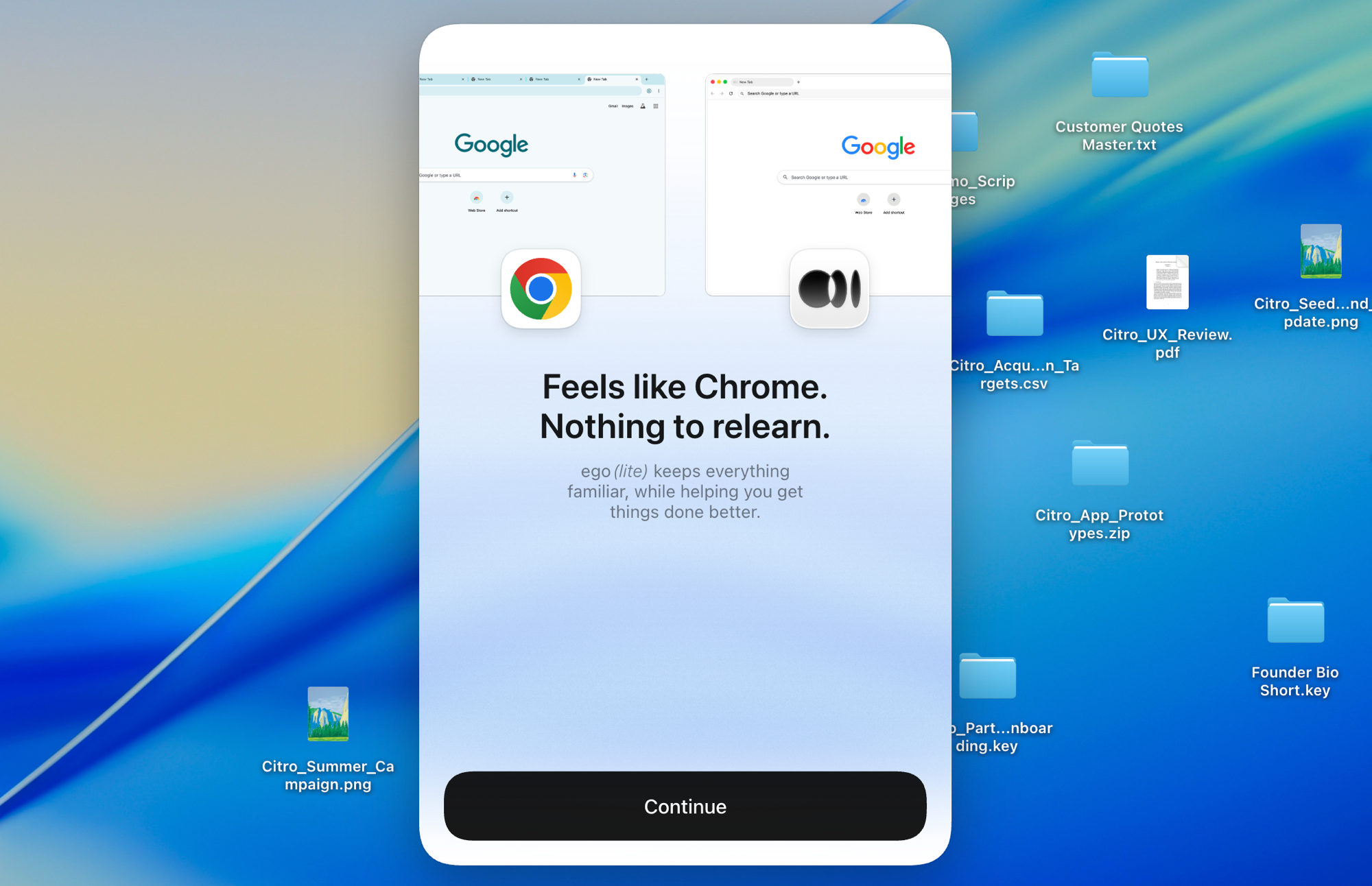
Costruito su Chromium, ego lite importa l'intera configurazione del tuo Chrome con un clic, dal vivo, senza dover chiudere nulla prima. I tuoi agenti ereditano gli accessi reali senza mai restare bloccati.

Importazione del profilo Chrome in ego lite: configurazione con un clic con tutti i tuoi accessi

ego lite vs Browser Harness

Feature comparison between ego lite and Browser Harness.
Funzionalitàego liteBrowser Harness
Chi fornisce il modelloIl tuo agente di coding (Claude Code, Codex, Cursor)Tu, fornisci una chiave API LLM e paghi per token
ConfigurazioneInstalla l'app, esegui /ego-browser nel tuo agenteProgetto Python, pip install, configurazione del modello, codice dell'attività
Siti con accesso già effettuato (SSO, 2FA)Importazione del profilo Chrome con un clic, già connesso di defaultChromium avviato autonomamente; il riutilizzo del profilo è manuale, con alcune limitazioni
Come vengono eseguite le azioniDiverse azioni raggruppate per turno in JavaScriptIl ciclo dell'agente richiama il modello a ogni passaggio
Costo in token per attivitàPiù basso: input Snapshot più azioni raggruppate, misurato per attivitàPiù alto: ogni passaggio reinvia lo stato della pagina al modello
Browser automation on live sites (31 tasks, same model)96.8% perfect, $1.98 per completed task, 30.3 round trips83.9% perfect, $3.04 per completed task, 51.2 round trips
Attività paralleleGli Spaces isolano le attività all'interno di un unico browser visibileSperimentale; più istanze dell'agente, oppure il cloud a pagamento
Funziona anche come il tuo browser quotidianoSì, tu navighi nel tuo Space, gli agenti lavorano nel loroNo, è una libreria di automazione e browser ospitati
Competenze riutilizzabili (in arrivo)Distilla le esecuzioni riuscite in competenze riutilizzabili; fino a 5x più veloce su attività complesse quando l'agente le ripete (beta limitata)Nessun equivalente integrato
PrezzoGratis, nessun abbonamentoOpen source gratuito; l'uso del cloud e dell'LLM è a pagamento
Ultimo aggiornamento 20 ago 2026

Una transizione senza intoppi

If you set up Browser Harness to automate your own browsing (research, form filling, logged-in chores) rather than to ship a product, the switch removes the whole project layer.

  1. Scarica ego (lite)

    Download ego lite and import your Chrome profile in one click. The logins you were configuring Browser Harness to reach come along automatically.

  2. Esegui il tuo primo task con /ego-browser

    Incolla nel tuo agente

    /ego-browser Apri ego.app e iscriviti alla waitlist

    Esegui /ego-browser in Claude Code, Codex o Cursor. Nessun ambiente Python, nessuna selezione del modello, nessuna chiave API.

  3. Guardalo in azione
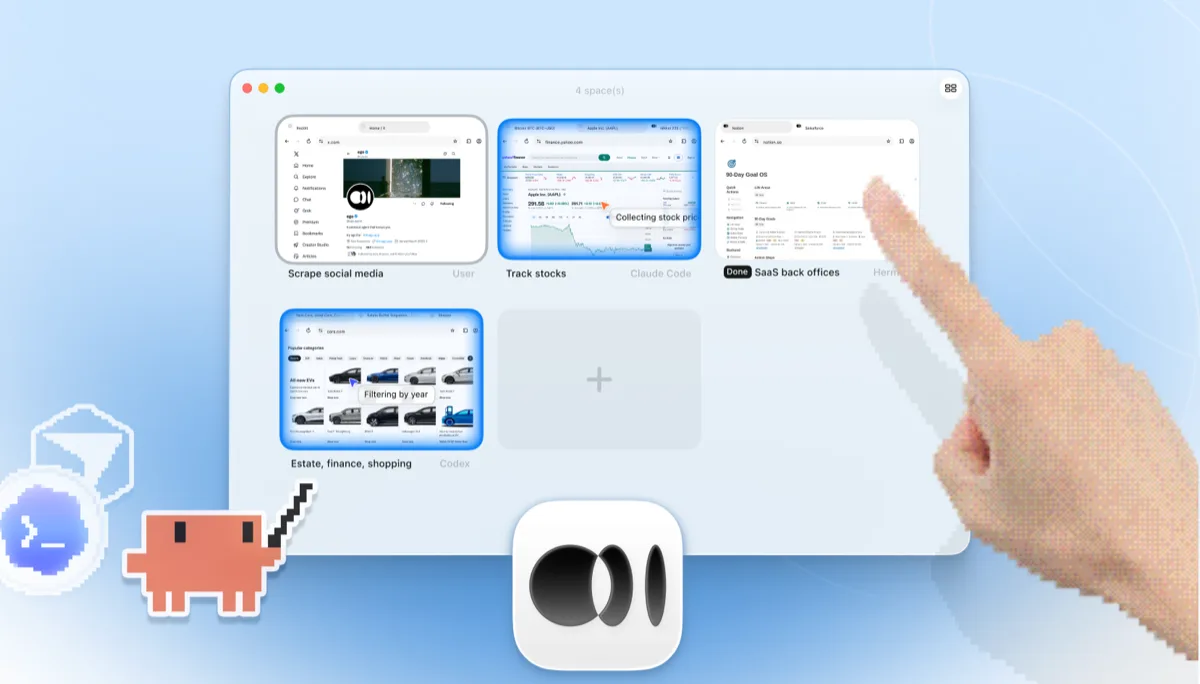
    Panoramica degli Spaces di ego lite con quattro attività di navigazione in esecuzione fianco a fianco: Claude Code che segue il titolo Apple su Yahoo Finance, Codex che filtra le auto per anno su cars.com, Hermes che completa un'attività di back-office SaaS, un utente che effettua scraping su X, e una mano che tocca + per aprire un altro Space

    L'attività viene eseguita nel proprio Space, non in un'istanza Chromium headless di cui puoi solo intuire il comportamento dai log. Guardala dal vivo o prendine il controllo in qualsiasi momento, e il risultato torna direttamente nella CLI del tuo agente.

Keep Browser Harness where it belongs: inside Python products and pipelines you're building for others. ego lite covers the agent browsing you do yourself.

Quando usare ogni strumento

Scegli ego (lite) se

  • Vuoi che un agente svolga il lavoro sul browser al posto tuo (ricerche, moduli, attività su siti con accesso già effettuato) senza costruire nulla in Python.
  • Usi già Claude Code, Codex o Cursor e non vuoi un secondo ciclo di agente con una propria fattura per la chiave API.
  • Le attività richiedono i tuoi accessi reali: l'importazione del profilo con un clic batte la configurazione manuale del profilo Chromium.
  • Vuoi attività eseguite in Spaces paralleli, in un browser con interfaccia visibile che puoi osservare o di cui puoi prendere il controllo.

Choose Browser Harness when

  • You're building a custom automation product or pipeline in Python. Browser Harness is a library designed to be embedded.
  • Vuoi gestire tu stesso il ciclo dell'agente nel tuo codice: scegliere il modello, definire i prompt, controllare ogni passaggio.
  • You need automations deployed to the cloud, running on Browser Use's hosted browsers when your laptop is closed.
  • Stai distribuendo automazione del browser ad altri utenti. ego lite è un browser per utenti finali, non un SDK.

Dai al tuo agente un browser vero

Gratis, funziona sul tuo Mac e importa il tuo profilo Chrome con un clic. Funziona con Claude Code, Codex, Cursor e qualsiasi agente CLI che scrive codice.

Still weighing your options? See how Browser Harness compares with the other tools in the same space.

FAQ

Browser Harness is Browser Use's local version. Browser Use is one of the most popular open-source AI browser agent projects: an MIT-licensed Python agent loop that lets an LLM control a browser, launching its own Chromium over the DevTools protocol and deciding actions step by step against the page state. You bring your own model API key and run it on your own machine. Browser Use's paid cloud product runs hosted browser agents with stealth and captcha-solving features, which is a different category from a local browser, so this page compares the harness: local against local. For developers building custom automation products and pipelines in Python, it's a strong, actively developed foundation, and of the five local tools we measured it posted the best completion rate of any competitor.

If you want an agent to do browser work for you, yes. ego lite plugs your existing coding agent into your real logged-in browser with no Python project and no API-key billing, and across 31 live-site jobs it finished 96.8% of tasks perfectly to Browser Harness's 83.9%, at $1.98 per completed task against $3.04. If you're building a browser-automation product or pipeline in Python, Browser Use is the better fit: it's a library designed to be embedded, and ego lite isn't an SDK.

Browser Use is the project; Browser Harness is its local version, the open-source Python agent loop you run on your own machine with your own LLM API key. Browser Use also sells a cloud product that runs hosted browser agents on their infrastructure. ego lite is a local browser, so the apples-to-apples comparison on this page is against Browser Harness; if you're weighing hosted browser infrastructure, see our Browserbase page instead.

We ran both tools on the same 31 browser automation tasks on live websites, driven by the same pi agent with the same model (gpt-5.6-sol, thinking effort max) and graded by the same written checklist. Each tool keeps its better of two full runs, so a failed task still counts. ego lite finished 30 of 31 tasks perfectly (96.8%) at $1.98 per completed task on 30.3 model turns; Browser Harness finished 26 of 31 (83.9%) at $3.04 on 51.2 turns, the best completion rate of any competitor measured. Browser Use's hosted cloud product was not part of the run; the comparison is local against local. The tasks, the checklists, and the raw results are open source in the ego-browser-benchmark-framework repository on GitHub, so every number can be audited or reproduced.

Browser Harness can, with manual configuration, and it's a common source of friction. The --profile flag copies your live Chrome profile into a temp directory, and on Windows that copy fails outright while Chrome is running and holding file locks, so the workaround is closing Chrome first. Connecting to an already-running Chrome over CDP works too, but Chrome 136 and later blocks CDP on your default profile, so most setups end up on a separate, non-default one. In ego lite, the real profile is the starting point: one-click import of logins, cookies, sessions, and extensions, shared safely with your own browsing through separate Spaces.

No. Non c'è nessun ciclo del modello separato da finanziare. L'intelligenza arriva dall'agente di coding che già usi, che sia Claude Code, Codex, Cursor, Gemini CLI o OpenCode. ego lite stessa è gratuita, senza abbonamento.

Entrambi sono strumenti open source per la navigazione guidata da LLM, ma Browser Use è un framework per agenti in Python costruito attorno a un ciclo autonomo, mentre Stagehand è l'SDK di Browserbase pensato prima di tutto per TypeScript, con primitive act/extract/observe per un'automazione ibrida tra codice e AI. Entrambi partono dal codice: crei un progetto e fornisci l'accesso al modello. Consulta la nostra pagina ego lite vs Stagehand per quel lato del confronto.

Risolvono livelli diversi. Browser Use è il framework per agenti; Browserbase è l'infrastruttura cloud di browser su cui i framework girano. I team spesso combinano una libreria per agenti con browser ospitati per scalare in produzione, ed è un vantaggio concreto per le flotte cloud. ego lite non si colloca in nessuno dei due livelli: è un browser locale, con interfaccia visibile, per il lavoro dell'agente che svolgi sulla tua macchina, con i tuoi account.

Browser Harness's agent loop calls the model at every step, and each call carries a fresh serialized snapshot of the page just to plan the next batch of clicks. Users running recurring or long-horizon tasks have asked the maintainers how to cut that cost, since the same task run the same way still pays full model price every time. On those 31 jobs that loop averaged 51.2 model round trips per task, the most of the five tools measured, against ego lite's 30.3. ego lite reduces the round trips themselves: the agent batches several actions in one JavaScript execution and reads pages as compressed Snapshots, so the savings compound over a whole task.

La shell ego-browser che collega gli agenti al browser è open source con licenza MIT. Il browser ego lite in sé è un'app gratuita per macOS, senza abbonamento, e i tuoi dati restano locali.