





ego (lite) はブラウザそのもの、ego は端末を横断して動くあなた専属のエージェントです。
順番待ちリストに参加する
ego lite vs Browser Harness

The Best Browser Harness Alternative

Browser Harness is Browser Use's local version: a Python agent loop you run on your own machine with your own LLM API key, launching its own browser and calling the model again at every step to plan the next move.

ego lite needs no framework: the coding agent you already run drives your real, logged-in browser directly, batching actions instead of narrating them one at a time. Across 31 live-site jobs it finishes 96.8% of tasks with a perfect score to Browser Harness's 83.9%, on 41% fewer model round trips.

導入している開発者の所属先
GoogleAmazonShopifyTikTokHarvardStanfordUSCUCLA

Browser automation benchmark: ego lite vs Browser Harness

This is live browser automation, not a sandbox demo. ego lite and Browser Harness, Browser Use's local version, ran the same 31 multi-step tasks on real websites: several pages, several decisions, often a login you already have. The hosted cloud product was not part of this run. Local against local, same jobs, scored the same way.

agent: pimodel: ChatGPT 5.6 Solthinking: max31 tasks

Task completion rate

How often the agent finished the job. Stuck at login, skipped a step, or returned the wrong result: that task is a fail. Higher is better.

ego lite96.8%30 of 31 tasks perfect
Browser Harness (Browser Use local version)83.9%26 of 31 tasks perfect

Cost per completed task

What one finished job costs in model spend. Failures still get billed, so they push this number up. Lower is better.

ego lite$1.98
Browser Harness (Browser Use local version)$3.04

Model turns per task

How many times the model had to look at the page and choose the next action. Extra looks mean extra tokens, extra waiting, and extra places to stall. Lower is better.

ego lite30.3
Browser Harness (Browser Use local version)51.2

Average task time

How long a job took from start to finish, on average, including time spent waiting on the model. Lower is better.

ego lite8m 38s
Browser Harness (Browser Use local version)9m 58s

We ran every tool twice and kept the better score. A failed task still counts against it.

Check the numbers, or rerun the tasks yourselfThe 31 tasks, the grading checklists, and the raw results are open source. If a number looks off, open the repo.ego-browser-benchmark-framework

Why ego lite is better than Browser Harness

With Browser Harness, the browser agent is something you build: a Python project, an LLM API key, a loop that calls the model every step. With ego lite, it's something you already have. Run /ego-browser inside Claude Code, Codex, or Cursor and your agent gets your actual browser, logins and all. (Browser Use's hosted cloud product is a different category; the local-versus-local matchup is this page.)

96.8% of tasks done perfectly. No other tool tops 84%.

Browser Harness's agent loop calls the LLM at every step: read the page, decide the next batch of actions, wait, repeat. It turned in the most careful runs of any competitor on those 31 jobs, and paid for the care in round trips: 51.2 model calls per task, the most of the five tools measured, each one re-sending page state just to plan the next few clicks.

In ego lite, every page reaches your agent as a compressed Snapshot it can act on immediately, several actions per JavaScript turn, no separate model loop deciding a step at a time. The result on the same 31 tasks: 96.8% perfect to Browser Harness's 83.9%, on 41% fewer round trips and 35% less model spend per completed task.

Time to finish a task, shorter is better
518 sego (lite)
598 sbrowser harness
Data source - Task: finish an average live-site job
並列マルチタスクで、より速く実行

Browser Use's own docs mark parallel Browser Harness runs experimental: developers note agents can conflict when they share resources, and real isolation means standing up a separate browser instance per task yourself.

ego lite では Space の数に上限はありません。それぞれが独自にインポートした Chrome プロファイル上で、同時に一つのタスクを実行します。どの Space もあなたのタブを奪うことはなく、いつでも好きな Space を見たり操作を引き継いだりできます。

何度も往復する必要はもうなし トークン消費も削減

Browser Harness's loop calls the model at every step and carries the page state along, and on longer tasks that cost compounds fast enough that users ask the Browser Use maintainers how to avoid burning tokens on a task that runs the same way every time.

ego lite のエージェントは、続行のために新しいモデル呼び出しを待つ代わりに、1ターンあたり数行の JavaScript で複数のアクションをまとめて実行します。Snapshot による入力と組み合わさることで、同じタスクを全体としてはるかに少ないトークンで完了できます。

Claude Code · ego lite
>/ego-browser Add the first product to the cart, then check checkout loads
Bash(
ego-browser nodejs <<'EOF' await openOrReuseTab('localhost:3000') await click('.product-card') await click('.add-to-cart') await click('a[href="/checkout"]') cliLog('checkout loaded') EOF
)
Output:
[t=4480ms] checkout loaded
Done. Both steps work.
─── 1 tool call · 1.1k tokens ───
Browser Harness · agent.run()
>$ python run_task.py 🎯 Task: Add the first product to the cart, then check checkout loads
📍 Step 1:
👍 Eval: Page loaded successfully
🧠 Memory: On demo store homepage, need to find a product
🎯 Next goal: Open first product and add it to cart
📍 Step 1: Ran 3 actions in 2.1s: ✅ 3
3.4k tokens sent so far
📍 Step 2:
👍 Eval: Product added to cart
🧠 Memory: Item in cart, now check checkout
🎯 Next goal: Navigate to checkout and confirm it loads
📍 Step 2: Ran 2 actions in 1.9s: ✅ 2
7.1k tokens sent so far
📍 Step 3:
👍 Eval: Checkout page did not load on first click
🧠 Memory: Link required a second click, retrying
🎯 Next goal: Retry the checkout link and wait for the form
📍 Step 3: Ran 1 action in 2.3s: ✅ 1
10.8k tokens sent so far
📍 Step 4:
👍 Eval: Payment form is present
🧠 Memory: Task complete
🎯 Next goal: done
📍 Step 4: Ran 1 action in 1.4s: ✅ 1
13.6k tokens sent so far
─── 4 model calls · 13.6k tokens ───
The same task, the same model. Left: one batched JavaScript call in ego lite, 1.1k tokens total. Right: Browser Harness's agent loop, a fresh model call per step, tokens climb to 13.6k.

同じ Chrome を、エージェントに最適化

Browser Harness launches its own Chromium over the DevTools protocol, and the Browser Use GitHub issues are full of developers hitting profile-lock errors pointing it at their real Chrome: the --profile flag copies the live profile into a temp directory, and on Windows that copy fails outright while Chrome holds the file locks.

Chromium をベースにした ego lite なら、Chrome の設定一式をワンクリックで、稼働中のまま、事前に何かを閉じる必要もなくインポートできます。エージェントは本物のログイン情報を引き継ぎ、詰まることはありません。

ego lite の Chrome プロファイルインポート:ワンクリックで全ログイン情報をセットアップ

ego lite vs Browser Harness

Feature comparison between ego lite and Browser Harness.
機能ego liteBrowser Harness
モデルは誰が用意するか使用中のコーディングエージェント (Claude Code、Codex、Cursor)自分自身。LLM の API キーを用意し、トークン単位で支払う
セットアップアプリをインストールし、エージェントで /ego-browser を実行Python プロジェクト、pip install、モデル設定、タスクコード
ログイン済みサイト (SSO、2FA)ワンクリックの Chrome プロファイルインポート、デフォルトでログイン済み起動した Chromium。プロファイルの再利用は手動で、いくつか注意点あり
アクションの実行方法1ターンあたり複数のアクションを JavaScript でまとめて実行AI エージェントループがステップごとにモデルを呼び出す
タスクあたりのトークンコスト低い:Snapshot 入力とバッチ化されたアクションにより、タスク単位で計測高い:ステップごとにページの状態をモデルへ再送信
Browser automation on live sites (31 tasks, same model)96.8% perfect, $1.98 per completed task, 30.3 round trips83.9% perfect, $3.04 per completed task, 51.2 round trips
並列タスク1つの可視ブラウザ内で Space がタスクを分離実験的機能。複数のエージェントインスタンス、または有料クラウドが必要
普段使いのブラウザとしても利用可能はい。あなたは自分の Space でブラウジングし、エージェントは自分たちの Space で作業しますいいえ、自動化ライブラリとホスト型ブラウザです
再利用可能なスキル (近日公開)成功した実行を再利用可能なスキルへと蒸留し、エージェントが繰り返すほど複雑なタスクで最大5倍高速化 (限定ベータ)標準機能としては非搭載
価格無料、サブスクリプションなしオープンソースは無料。クラウドと LLM の利用は有料
最終更新 2026年8月20日

移行をシームレスに

If you set up Browser Harness to automate your own browsing (research, form filling, logged-in chores) rather than to ship a product, the switch removes the whole project layer.

  1. ego (lite) をダウンロード

    Download ego lite and import your Chrome profile in one click. The logins you were configuring Browser Harness to reach come along automatically.

  2. /ego-browserで最初のタスクを実行

    エージェントに貼り付ける

    /ego-browser ego.app を開いてウェイトリストに参加

    Claude Code、Codex、Cursor で /ego-browser を実行するだけです。Python 環境も、モデル選択も、API キーも必要ありません。

  3. 動作を見る
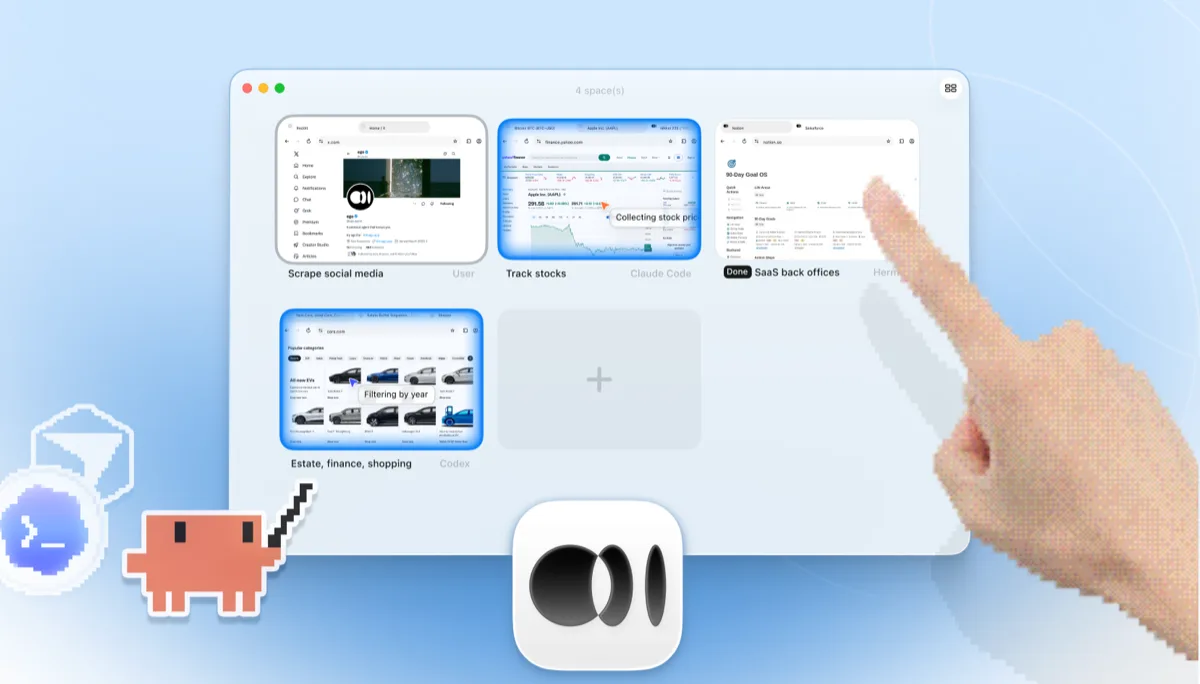
    4つのブラウザタスクを並べて表示する ego lite Space の概要:Claude Code が Yahoo Finance で Apple 株を追跡し、Codex が cars.com で年式ごとに車をフィルタリングし、Hermes が SaaS のバックオフィス業務を仕上げ、ユーザーが X をスクレイピングし、手が + をタップして新しい Space を開いている

    タスクはログからしか様子をうかがえないヘッドレスの Chromium インスタンスではなく、専用の Space で実行されます。いつでもライブで確認したり操作を引き継いだりでき、結果はエージェントの CLI にそのまま返ってきます。

Keep Browser Harness where it belongs: inside Python products and pipelines you're building for others. ego lite covers the agent browsing you do yourself.

それぞれのツールを使うべき場面

ego (lite) を選ぶべきケース

  • Python で何かを構築することなく、AI エージェントに自分のブラウザ作業 (リサーチ、フォーム入力、ログインが必要な作業) をやらせたい。
  • すでに Claude Code、Codex、Cursor を使っていて、独自の API キー課金が発生する2つ目のエージェントループは不要。
  • タスクに本物のログイン情報が必要:ワンクリックのプロファイルインポートは、手動での Chromium プロファイル設定より優れている。
  • タスクを並列の Space で実行し、見たり操作を引き継いだりできる画面付きのブラウザで動かしたい。

Choose Browser Harness when

  • You're building a custom automation product or pipeline in Python. Browser Harness is a library designed to be embedded.
  • AI エージェントループを自分のコードで所有したい:モデルを選び、プロンプトを設計し、各ステップを制御する。
  • You need automations deployed to the cloud, running on Browser Use's hosted browsers when your laptop is closed.
  • ブラウザ自動化を他者向けに出荷している。ego lite は SDK ではなく、エンドユーザー向けのブラウザ。

AI エージェントに本物のブラウザを

無料で Mac 上で動作し、ワンクリックで Chrome のプロファイルをインポートできます。Claude Code、Codex、Cursor、コードを書くあらゆる CLI エージェントに対応しています。

Still weighing your options? See how Browser Harness compares with the other tools in the same space.

よくある質問

Browser Harness is Browser Use's local version. Browser Use is one of the most popular open-source AI browser agent projects: an MIT-licensed Python agent loop that lets an LLM control a browser, launching its own Chromium over the DevTools protocol and deciding actions step by step against the page state. You bring your own model API key and run it on your own machine. Browser Use's paid cloud product runs hosted browser agents with stealth and captcha-solving features, which is a different category from a local browser, so this page compares the harness: local against local. For developers building custom automation products and pipelines in Python, it's a strong, actively developed foundation, and of the five local tools we measured it posted the best completion rate of any competitor.

If you want an agent to do browser work for you, yes. ego lite plugs your existing coding agent into your real logged-in browser with no Python project and no API-key billing, and across 31 live-site jobs it finished 96.8% of tasks perfectly to Browser Harness's 83.9%, at $1.98 per completed task against $3.04. If you're building a browser-automation product or pipeline in Python, Browser Use is the better fit: it's a library designed to be embedded, and ego lite isn't an SDK.

Browser Use is the project; Browser Harness is its local version, the open-source Python agent loop you run on your own machine with your own LLM API key. Browser Use also sells a cloud product that runs hosted browser agents on their infrastructure. ego lite is a local browser, so the apples-to-apples comparison on this page is against Browser Harness; if you're weighing hosted browser infrastructure, see our Browserbase page instead.

We ran both tools on the same 31 browser automation tasks on live websites, driven by the same pi agent with the same model (gpt-5.6-sol, thinking effort max) and graded by the same written checklist. Each tool keeps its better of two full runs, so a failed task still counts. ego lite finished 30 of 31 tasks perfectly (96.8%) at $1.98 per completed task on 30.3 model turns; Browser Harness finished 26 of 31 (83.9%) at $3.04 on 51.2 turns, the best completion rate of any competitor measured. Browser Use's hosted cloud product was not part of the run; the comparison is local against local. The tasks, the checklists, and the raw results are open source in the ego-browser-benchmark-framework repository on GitHub, so every number can be audited or reproduced.

Browser Harness can, with manual configuration, and it's a common source of friction. The --profile flag copies your live Chrome profile into a temp directory, and on Windows that copy fails outright while Chrome is running and holding file locks, so the workaround is closing Chrome first. Connecting to an already-running Chrome over CDP works too, but Chrome 136 and later blocks CDP on your default profile, so most setups end up on a separate, non-default one. In ego lite, the real profile is the starting point: one-click import of logins, cookies, sessions, and extensions, shared safely with your own browsing through separate Spaces.

いいえ。課金が発生する別個のモデルループはありません。知能の部分は、Claude Code、Codex、Cursor、Gemini CLI、OpenCode など、すでに使っているコーディングエージェントが担います。ego lite 自体はサブスクリプションなしの無料です。

どちらも LLM 駆動のブラウジングを実現するオープンソースツールですが、Browser Use は自律ループを中心に構築された Python の AI エージェントフレームワークであるのに対し、Stagehand は Browserbase が提供する TypeScript ファーストの SDK で、act/extract/observe というプリミティブを使ってコードと AI を組み合わせたハイブリッド自動化を実現します。どちらもコードファーストで、プロジェクトを組み立ててモデルへのアクセスを用意する必要があります。この比較については、ego lite vs Stagehand のページをご覧ください。

両者は異なる層の課題を解決します。Browser Use は AI エージェントフレームワークであり、Browserbase はそのフレームワークが動作するクラウドブラウザインフラです。多くのチームは本番規模に対応するため、エージェントライブラリとホスト型ブラウザを組み合わせており、それはクラウド運用にとって確かなメリットです。ego lite はどちらの層にも属しません。自分のマシン上で、自分のアカウントを使って行うエージェント作業のための、ローカルの画面付きブラウザです。

Browser Harness's agent loop calls the model at every step, and each call carries a fresh serialized snapshot of the page just to plan the next batch of clicks. Users running recurring or long-horizon tasks have asked the maintainers how to cut that cost, since the same task run the same way still pays full model price every time. On those 31 jobs that loop averaged 51.2 model round trips per task, the most of the five tools measured, against ego lite's 30.3. ego lite reduces the round trips themselves: the agent batches several actions in one JavaScript execution and reads pages as compressed Snapshots, so the savings compound over a whole task.

エージェントとブラウザをつなぐ ego-browser のシェルは MIT ライセンスのオープンソースです。ego lite ブラウザ自体は macOS 向けの無料アプリでサブスクリプションはなく、データはローカルに保存されます。