





ego (lite) はブラウザそのもの、ego は端末を横断して動くあなた専属のエージェントです。
順番待ちリストに参加する
ego lite vs Playwright

最良のPlaywright代替ツール

Playwrightは、Microsoftによるスクリプト先行型の自動化フレームワークです。ブラウザコンテキストに対してTypeScriptやPythonでコードを書き、ロケーターを組み上げていきますが、サイトが変わるたびにその修正に追われることになります。

ego lite skips the script. Your agent reads the page as a compressed Snapshot and writes its own JavaScript, already signed into your real Chrome. Across 31 live browser automation jobs it finishes 96.8% of tasks with a perfect score; agent-driven Playwright finishes 71%.

導入している開発者の所属先
GoogleAmazonShopifyTikTokHarvardStanfordUSCUCLA

Browser automation benchmark: ego lite vs Playwright

This is agent-driven browser automation on live websites, not a scripted test suite you commit to CI. ego lite and Playwright ran the same 31 multi-step tasks end to end: several pages, several decisions, many behind a login. A locator recorded last month often dies on those pages. Both ran the identical set, so the bars below compare the same jobs.

agent: pimodel: ChatGPT 5.6 Solthinking: max31 tasks

Task completion rate

How often the agent finished the job. Stuck at login, skipped a step, or returned the wrong result: that task is a fail. Higher is better.

ego lite96.8%30 of 31 tasks perfect
playwright-cli71.0%22 of 31 tasks perfect

Cost per completed task

What one finished job costs in model spend. Failures still get billed, so they push this number up. Lower is better.

ego lite$1.98
playwright-cli$4.61

Model turns per task

How many times the model had to look at the page and choose the next action. Extra looks mean extra tokens, extra waiting, and extra places to stall. Lower is better.

ego lite30.3
playwright-cli42.8

Average task time

How long a job took from start to finish, on average, including time spent waiting on the model. Lower is better.

ego lite8m 38s
playwright-cli11m 33s

We ran every tool twice and kept the better score. A failed task still counts against it.

Playwright ran through playwright-cli, the CLI Microsoft ships for coding agents. Not a saved test script.

Check the numbers, or rerun the tasks yourselfThe 31 tasks, the grading checklists, and the raw results are open source. If a number looks off, open the repo.ego-browser-benchmark-framework

ego liteがPlaywrightより優れている理由

Playwrightは現代的なテストフレームワークとしての地位を確立しており、CIでの確定的なE2Eテストスイートにおいては今も最有力の選択肢です。しかし、作業がインタラクティブな場合、このダッシュボードの情報を取得する、あの経費を申請する、昼休み前に3つのフローを確認する、といった場面ではスクリプトはむしろ負担になります。ego liteなら、オープンソースの ego-browserシェルを通じて、すでに使っているコーディングエージェントにその作業を任せられます。

96.8% of tasks done perfectly. No other tool tops 84%.

A Playwright script survives about as long as the page it was recorded against. Codegen locators capture one DOM snapshot, and a redesign a few months later leaves you patching selectors instead of shipping. Even driven by an agent through Microsoft's own playwright-cli, 29% of those 31 live-site tasks ended short of a perfect score.

In ego lite, your agent reads the page as a compressed Snapshot with stable @N refs and writes the JavaScript itself, so it adapts when the page changes instead of breaking: 96.8% of the same 31 tasks ended perfect, at the fastest average task time of the five tools measured.

Time to finish a task, shorter is better
518 sego (lite)
693 splaywright-cli
Data source - Task: finish an average live-site job
並列マルチタスクで、より速く実行

Playwrightの並列テスト実行は、デフォルトでヘッドレスです。ヘッド付きモードにすると、ワーカーごとに別々のOSウィンドウが散らばり、どれか1つを一時停止して操作を引き継ぐ方法もありません。そのため多くのチームはヘッドレスのままにして、あとからトレースファイルを確認しています。

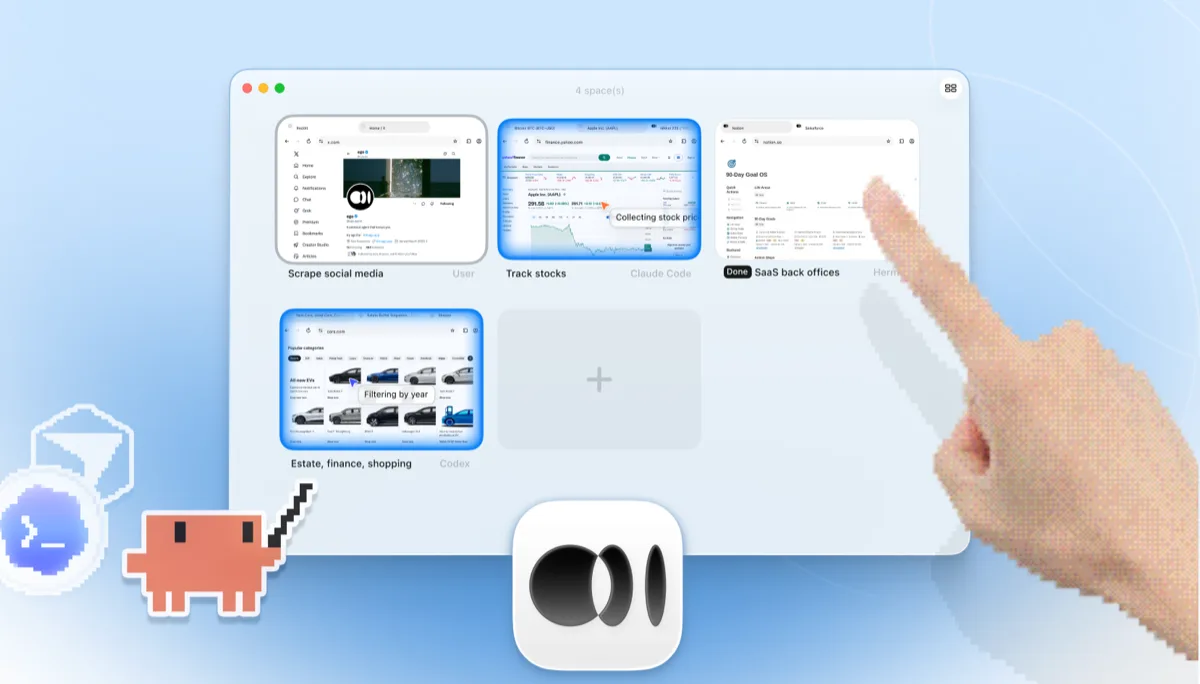
ego liteでは、開くSpaceの数に上限はありません。それぞれが独自にインポートしたChromeプロファイル上で同時に1つのタスクを実行し、あなたが使っているタブを奪うことは一切ありません。どのSpaceも、いつでもリアルタイムで確認したり、操作を引き継いだりできます。

何度も往復する必要はもうなし トークン消費も削減

エージェントからMicrosoft公式のplaywright-cliを使ってPlaywrightを操作しても、結局は1つのアクションごとに1つのコマンドを発行することになります。スナップショットを取り、参照をクリックし、再度スナップショットを取り、結果を読み取り、次のコマンドを決める、という流れです。

ego liteでは、エージェントが1回のターンで複数のアクションを1つのJavaScript呼び出しにまとめ、ページ全体のアクセシビリティダンプではなく圧縮されたSnapshotとして読み取ります。これらが積み重なることで、タスク全体で使うトークン数を大幅に減らせます。

Claude Code · ego lite
>/ego-browser Add the first product to the cart, then check checkout loads
Bash(
ego-browser nodejs <<'EOF' await openOrReuseTab('localhost:3000') await click('.product-card') await click('.add-to-cart') await click('a[href="/checkout"]') cliLog('checkout loaded') EOF
)
Output:
[t=4480ms] checkout loaded
Done. Both steps work.
─── 1 tool call · 1.1k tokens ───
Claude Code · playwright-cli
>Add the first product to the cart, then check checkout loads
$playwright-cli open localhost:3000
stdout
Opened http://localhost:3000
1.6k tokens sent so far
Storefront loaded. Snapshotting to find the first product.
$playwright-cli snapshot
Snapshot
… +224 lines (ctrl+o to expand)
3.1k tokens sent so far
First product card is e12. Clicking it.
$playwright-cli click e12
stdout
Clicked e12
4.9k tokens sent so far
Product page is up, refs are stale. Snapshotting again.
$playwright-cli snapshot
Snapshot
… +205 lines (ctrl+o to expand)
6.8k tokens sent so far
Add to cart button is e8.
$playwright-cli click e8
stdout
Clicked e8
9.2k tokens sent so far
Added. Heading to checkout.
$playwright-cli click e21
stdout
Clicked e21
11.2k tokens sent so far
Confirming the checkout page actually rendered.
$playwright-cli snapshot
Snapshot
… +229 lines (ctrl+o to expand)
13.6k tokens sent so far
─── 7 tool calls · 13.6k tokens ───
同じタスク、同じモデル。 左:ego liteでの1回のバッチ処理されたJavaScript呼び出し、合計1.1kトークン。 右:playwright-cliを介したPlaywrightの操作、7回の往復、トークン数は13.6kまで増加。

同じ Chrome を、エージェントに最適化

新しいPlaywrightのコンテキストは何もない状態から始まるため、実際の認証を行うにはログイン処理をスクリプト化し、storageStateを保存し、そのトークンがテスト実行中ずっと有効であることを願うしかありません。Auth0がMFA下で行っているようにプロバイダーがリフレッシュトークンをローテーションすると、保存した状態は結局壊れてしまいます。

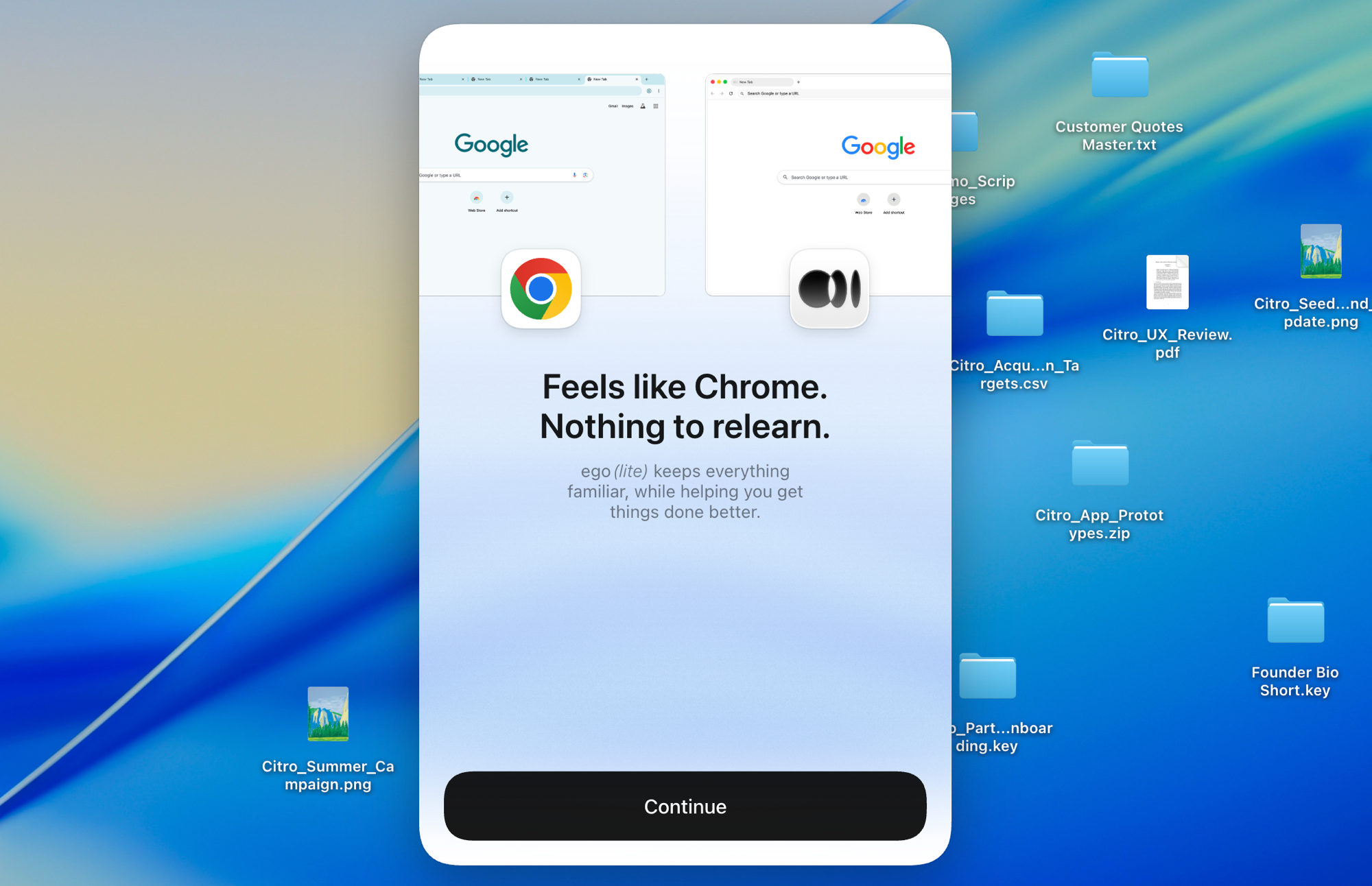
ego liteはワンクリックでChromeプロファイル全体をインポートします。クッキー、セッション、拡張機能もすべてそのまま引き継がれるため、エージェントは最初から、あなたがログインしているすべての場所にサインイン済みの状態で動作を始められます。

ego liteのChromeプロファイルインポート: ワンクリックでログイン情報をすべて引き継ぎ、storageStateファイルも不要

ego lite vs Playwright

ego liteとPlaywrightの機能比較。
機能ego litePlaywright
作業の進め方タスクを説明するだけで、エージェントがブラウザを操作TS/Python/Java/.NETでスクリプトを書き、保守する
ページの変化への対応エージェントがSnapshotを再取得して適応するロケーターが壊れたら、コードを直すのは自分
ログイン済みサイト (SSO、2FA)実際のChromeプロファイルとセッションをそのまま継承空のコンテキストから開始。ログインをスクリプト化し、storageStateを管理
セットアップアプリをインストールし、エージェントで /ego-browser を実行Node/Pythonプロジェクトを用意し、ブラウザをインストールし、設定ファイルを書く
AI エージェントとの連携そのために作られている: ego-browser経由でClaude Code、Codex、Cursorに対応codegen、playwright-cli、または別立てのPlaywright MCPサーバー経由
Browser automation on live sites (31 tasks, same model)96.8% perfect, $1.98 per completed task, 8m 38s average71% perfect, $4.61 per completed task, 11m 33s average (via playwright-cli)
並列タスク1つの可視ブラウザ内で Space がタスクを分離WorkerとContext、基本はヘッドレス
日常使いブラウザはい。あなたは自分のSpaceで閲覧し、エージェントは別のSpaceで作業するいいえ。日常使いのブラウザではなく、自動化ライブラリ
CIのテストスイート対応いいえ。コミットされるテストコードではなく、対話的なエージェントタスク向けはい。テストランナーとCIの実績にかけては、群を抜いています
再利用可能なスキル (近日公開)成功した実行を再利用可能なスキルへと蒸留し、エージェントが繰り返すほど複雑なタスクで最大5倍高速化 (限定ベータ)標準機能としては非搭載
価格無料、サブスクリプションなし無料、オープンソース
最終更新 2026年8月20日

移行をシームレスに

Playwrightのテストを ego liteに移植する必要はありません。そのまま残しておいてください。移ってくるのは、CIの外でスクリプト化していた(あるいはスクリプト化を避けていた)作業のすべてです。一度きりで、ログインが必要で、毎週のように変わるブラウザ作業のことです。

  1. ego (lite) をダウンロード

    ego liteをダウンロードして、Chromeプロファイルをワンクリックでインポートします。テストコンテキストには一度も持たせたことのなかったログイン情報も、そのまま一緒に引き継がれます。

  2. /ego-browserで最初のタスクを実行

    エージェントに貼り付ける

    /ego-browser ego.appを開いて、ナビゲーションバー内のリンクをすべてリストアップする

    Claude Code、Codex、Cursorで/ego-browserを実行します。プロジェクトの雛形もplaywright.configも不要です。

  3. 動作を見る
    4つのブラウザタスクを並べて表示する ego lite Space の概要:Claude Code が Yahoo Finance で Apple 株を追跡し、Codex が cars.com で年式ごとに車をフィルタリングし、Hermes が SaaS のバックオフィス業務を仕上げ、ユーザーが X をスクレイピングし、手が + をタップして新しい Space を開いている

    普段ならスクリプトを書いていたようなタスクを、一文で説明してエージェントに渡します。ログイン済みダッシュボードから数字を取得する、チェックアウトの流れを一通り進める、といった作業です。

決定的な結果が必要なCIのE2Eスイートには、Playwrightを使い続けてください。対話的なエージェント作業は ego liteが担い、両者はその役割を争うものではありません。

それぞれのツールを使うべき場面

ego (lite) を選ぶべきケース

  • その作業はログインの向こう側にあります。ダッシュボード、管理画面、SSOなど、storageStateをスクリプト化する労力に見合わないものです。
  • タスクの内容をClaude Code、Codex、Cursorに説明するだけで済ませたい。テストプロジェクトを構築してロケーターを保守するのは避けたい。
  • 同じブラウザで作業を続けながら、複数のフローを並行するSpacesでチェックしたい。
  • タスクごとのトークンコストを重視している。Snapshot入力とバッチ化されたJavaScriptを組み合わせることで、タスク全体を安く済ませられる。

Playwrightを選ぶべきケース

  • CI上で決定論的に実行される、コミット対象のE2Eテストスイートを構築している。これはPlaywrightの核心的な強みだ。
  • テストランナー、自動待機、trace viewer、codegenといった機能に依存している。これらは他の多くの競合ツールにはまだ欠けている。
  • FirefoxとWebKitのカバレッジが必要だ。ego liteはChromiumのみに対応している。
  • チームがTypeScript、Python、Java、.NETを併用しており、それぞれでファーストクラスのバインディングを求めている。

AI エージェントに本物のブラウザを

無料で Mac 上で動作し、ワンクリックで Chrome のプロファイルをインポートできます。Claude Code、Codex、Cursor、コードを書くあらゆる CLI エージェントに対応しています。

まだ検討中なら、同じ領域の他のツールとPlaywrightを比較したページも確認してほしい。

よくある質問

PlaywrightはMicrosoftによるオープンソースの自動化フレームワークで、Chromium、Firefox、WebKitに対応し、TypeScript、Python、Java、.NET向けにファーストクラスのバインディングを備えている。テストランナー、自動待機、trace viewer、CI統合はこのカテゴリで最も強力で、コミット対象の決定論的なE2Eテストスイートにおいては最も優れたツールだ。Microsoftはさらに、Claude CodeやCopilotのようなコーディングエージェント向けに、Playwrightチームがトークン効率を意識して開発した相棒的なCLI、playwright-cliの提供も始めている。このページで扱うのはコアフレームワークと、そのスクリプティングおよびCLIワークフローについてであり、エージェント向けの別のMCPサーバーであるPlaywright MCPについては専用の比較ページを用意している。エージェント駆動型のアプローチを選ぶ開発者は、Browser Use vs PlaywrightやStagehand vs Playwrightも比較検討することが多い。この3つはLLM駆動のブラウジングスタックの大半に登場するからだ。

AI エージェント駆動のブラウザ操作であれば、答えはイエスだ。スクリプトは不要で、実際のログイン状態を使え、並行Spacesも使える。スクリプトを増やすのではなく、エージェント専用に作られた数少ないPlaywright代替ツールの一つと言える。一方、CIでコミットするE2Eテストスイートであれば、答えはノーだ。Playwrightのテストランナー、トレース機能、クロスブラウザ対応は本当に優れているので、そのまま使い続けるべきだ。正直な線引きはこうなる。コミットするテストはPlaywright、委任するタスクは ego lite。

We ran both tools on the same 31 browser automation tasks on live websites, driven by the same pi agent with the same model (gpt-5.6-sol, thinking effort max) and graded by the same written checklist. Each tool keeps its better of two full runs. Playwright entered through playwright-cli, the companion CLI the Playwright team ships for coding agents, which is the strongest agent-facing way to run it today. ego lite finished 30 of 31 tasks perfectly (96.8%) at $1.98 per completed task; agent-driven Playwright finished 22 of 31 (71%) at $4.61. The tasks, the checklists, and the raw results are open source in the ego-browser-benchmark-framework repository on GitHub, so every number can be audited or reproduced.

この3つはいずれもスクリプトファーストのフレームワークだ。playwright vs puppeteerで検索しても、puppeteer vs playwrightで検索しても同じことになる。新規のテストスイートならPlaywrightが優位だ。最速のランナー、自動待機、TS/Python/Java/.NET対応、3つのエンジンすべてに対応している。Node環境でChrome専用に絞り、DevToolsレベルの軽量なAPIを求めるならPuppeteerが優位だ。W3C WebDriver標準、幅広い言語バインディング、既存のエンタープライズGridが重要ならSeleniumが優位だ。ego liteはまた別の役割を担う。スクリプトの代わりにAI エージェントがブラウジングを行い、保守すべきコードはなく、実際にログイン済みのプロファイルがすでに紐づいている。

Selenium vs Playwrightは、どちらにもトレードオフがある話になる。Playwrightは実行速度が速く、自動待機が組み込まれていて、モダンなテストランナーとtrace viewerやcodegenといったツール群を備えている。その代わりエコシステムはまだ新しい。Seleniumは、W3C WebDriver標準に準拠し、言語対応やレガシーブラウザのカバレッジが最も広く、20年にわたるエンタープライズでの採用実績がある。その代わりコードは冗長になりやすく、待機処理も明示的に管理する必要がある。今からテストフレームワークを選ぶなら、多くのチームはPlaywrightを選ぶ。スクリプトではなくエージェント駆動の作業であれば、ego liteとSeleniumの比較をSeleniumのページで確認してほしい。

Both wrap a fresh Playwright browser for agent use, and both still run one command per action in a blank profile: Playwright MCP as MCP tool calls, playwright-cli as CLI invocations. ego lite instead batches multiple actions in JavaScript per turn, reads pages as compressed Snapshots, and starts from your real logged-in Chrome profile. Across those 31 live-site jobs that difference measures out to 96.8% of tasks perfect against 71%, at $1.98 per completed task against $4.61, with playwright-cli as the Playwright entrant. Full breakdown on the ego lite vs Playwright MCP page.

部分的には可能だ。スクリプトでログインした後にstorageStateを保存する方法や、Chromeのプロファイルディレクトリを指定してpersistent contextを起動する方法があるが、セッションは期限切れになり、2FAやSSOがスクリプトによるログインを妨げ、稼働中のChromeとプロファイルを共有することもできない。ego liteはプロファイルを一度取り込めば、それ以降エージェントが実際のログイン状態を引き継いでくれる。

はい。無料でサブスクリプションもなく、データはローカルに保存される。エージェントが接続する ego-browserシェルは、MITライセンスのオープンソースだ。