





ego (lite)는 그저 브라우저일 뿐이고, ego는 여러 기기를 넘나드는 나만의 에이전트입니다.
대기자 명단 등록
ego lite vs Browser Harness

The Best Browser Harness Alternative

Browser Harness is Browser Use's local version: a Python agent loop you run on your own machine with your own LLM API key, launching its own browser and calling the model again at every step to plan the next move.

ego lite needs no framework: the coding agent you already run drives your real, logged-in browser directly, batching actions instead of narrating them one at a time. Across 31 live-site jobs it finishes 96.8% of tasks with a perfect score to Browser Harness's 83.9%, on 41% fewer model round trips.

다음 소속 개발자들이 신뢰합니다
GoogleAmazonShopifyTikTokHarvardStanfordUSCUCLA

Browser automation benchmark: ego lite vs Browser Harness

This is live browser automation, not a sandbox demo. ego lite and Browser Harness, Browser Use's local version, ran the same 31 multi-step tasks on real websites: several pages, several decisions, often a login you already have. The hosted cloud product was not part of this run. Local against local, same jobs, scored the same way.

agent: pimodel: ChatGPT 5.6 Solthinking: max31 tasks

Task completion rate

How often the agent finished the job. Stuck at login, skipped a step, or returned the wrong result: that task is a fail. Higher is better.

ego lite96.8%30 of 31 tasks perfect
Browser Harness (Browser Use local version)83.9%26 of 31 tasks perfect

Cost per completed task

What one finished job costs in model spend. Failures still get billed, so they push this number up. Lower is better.

ego lite$1.98
Browser Harness (Browser Use local version)$3.04

Model turns per task

How many times the model had to look at the page and choose the next action. Extra looks mean extra tokens, extra waiting, and extra places to stall. Lower is better.

ego lite30.3
Browser Harness (Browser Use local version)51.2

Average task time

How long a job took from start to finish, on average, including time spent waiting on the model. Lower is better.

ego lite8m 38s
Browser Harness (Browser Use local version)9m 58s

We ran every tool twice and kept the better score. A failed task still counts against it.

Check the numbers, or rerun the tasks yourselfThe 31 tasks, the grading checklists, and the raw results are open source. If a number looks off, open the repo.ego-browser-benchmark-framework

Why ego lite is better than Browser Harness

With Browser Harness, the browser agent is something you build: a Python project, an LLM API key, a loop that calls the model every step. With ego lite, it's something you already have. Run /ego-browser inside Claude Code, Codex, or Cursor and your agent gets your actual browser, logins and all. (Browser Use's hosted cloud product is a different category; the local-versus-local matchup is this page.)

96.8% of tasks done perfectly. No other tool tops 84%.

Browser Harness's agent loop calls the LLM at every step: read the page, decide the next batch of actions, wait, repeat. It turned in the most careful runs of any competitor on those 31 jobs, and paid for the care in round trips: 51.2 model calls per task, the most of the five tools measured, each one re-sending page state just to plan the next few clicks.

In ego lite, every page reaches your agent as a compressed Snapshot it can act on immediately, several actions per JavaScript turn, no separate model loop deciding a step at a time. The result on the same 31 tasks: 96.8% perfect to Browser Harness's 83.9%, on 41% fewer round trips and 35% less model spend per completed task.

Time to finish a task, shorter is better
518 sego (lite)
598 sbrowser harness
Data source - Task: finish an average live-site job
병렬 멀티태스킹으로 더 빠르게 실행

Browser Use's own docs mark parallel Browser Harness runs experimental: developers note agents can conflict when they share resources, and real isolation means standing up a separate browser instance per task yourself.

ego lite에서는 Space 개수에 제한이 없습니다. 각 Space는 가져온 Chrome 프로필로 자신만의 작업을 동시에 실행합니다. 어떤 Space도 당신의 탭을 가로채지 않으며, 언제든 어떤 Space든 지켜보거나 직접 넘겨받을 수 있습니다.

불필요한 왕복 없이 토큰 비용은 더 적게

Browser Harness's loop calls the model at every step and carries the page state along, and on longer tasks that cost compounds fast enough that users ask the Browser Use maintainers how to avoid burning tokens on a task that runs the same way every time.

ego lite의 에이전트는 새로운 모델 호출을 기다리는 대신, 한 턴에 몇 줄의 JavaScript로 여러 동작을 한 번에 처리합니다. 여기에 Snapshot 입력까지 더해지면, 같은 작업을 전체적으로 훨씬 더 적은 토큰으로 끝낼 수 있습니다.

Claude Code · ego lite
>/ego-browser Add the first product to the cart, then check checkout loads
Bash(
ego-browser nodejs <<'EOF' await openOrReuseTab('localhost:3000') await click('.product-card') await click('.add-to-cart') await click('a[href="/checkout"]') cliLog('checkout loaded') EOF
)
Output:
[t=4480ms] checkout loaded
Done. Both steps work.
─── 1 tool call · 1.1k tokens ───
Browser Harness · agent.run()
>$ python run_task.py 🎯 Task: Add the first product to the cart, then check checkout loads
📍 Step 1:
👍 Eval: Page loaded successfully
🧠 Memory: On demo store homepage, need to find a product
🎯 Next goal: Open first product and add it to cart
📍 Step 1: Ran 3 actions in 2.1s: ✅ 3
3.4k tokens sent so far
📍 Step 2:
👍 Eval: Product added to cart
🧠 Memory: Item in cart, now check checkout
🎯 Next goal: Navigate to checkout and confirm it loads
📍 Step 2: Ran 2 actions in 1.9s: ✅ 2
7.1k tokens sent so far
📍 Step 3:
👍 Eval: Checkout page did not load on first click
🧠 Memory: Link required a second click, retrying
🎯 Next goal: Retry the checkout link and wait for the form
📍 Step 3: Ran 1 action in 2.3s: ✅ 1
10.8k tokens sent so far
📍 Step 4:
👍 Eval: Payment form is present
🧠 Memory: Task complete
🎯 Next goal: done
📍 Step 4: Ran 1 action in 1.4s: ✅ 1
13.6k tokens sent so far
─── 4 model calls · 13.6k tokens ───
The same task, the same model. Left: one batched JavaScript call in ego lite, 1.1k tokens total. Right: Browser Harness's agent loop, a fresh model call per step, tokens climb to 13.6k.

Chrome과 같은 경험, 에이전트 네이티브

Browser Harness launches its own Chromium over the DevTools protocol, and the Browser Use GitHub issues are full of developers hitting profile-lock errors pointing it at their real Chrome: the --profile flag copies the live profile into a temp directory, and on Windows that copy fails outright while Chrome holds the file locks.

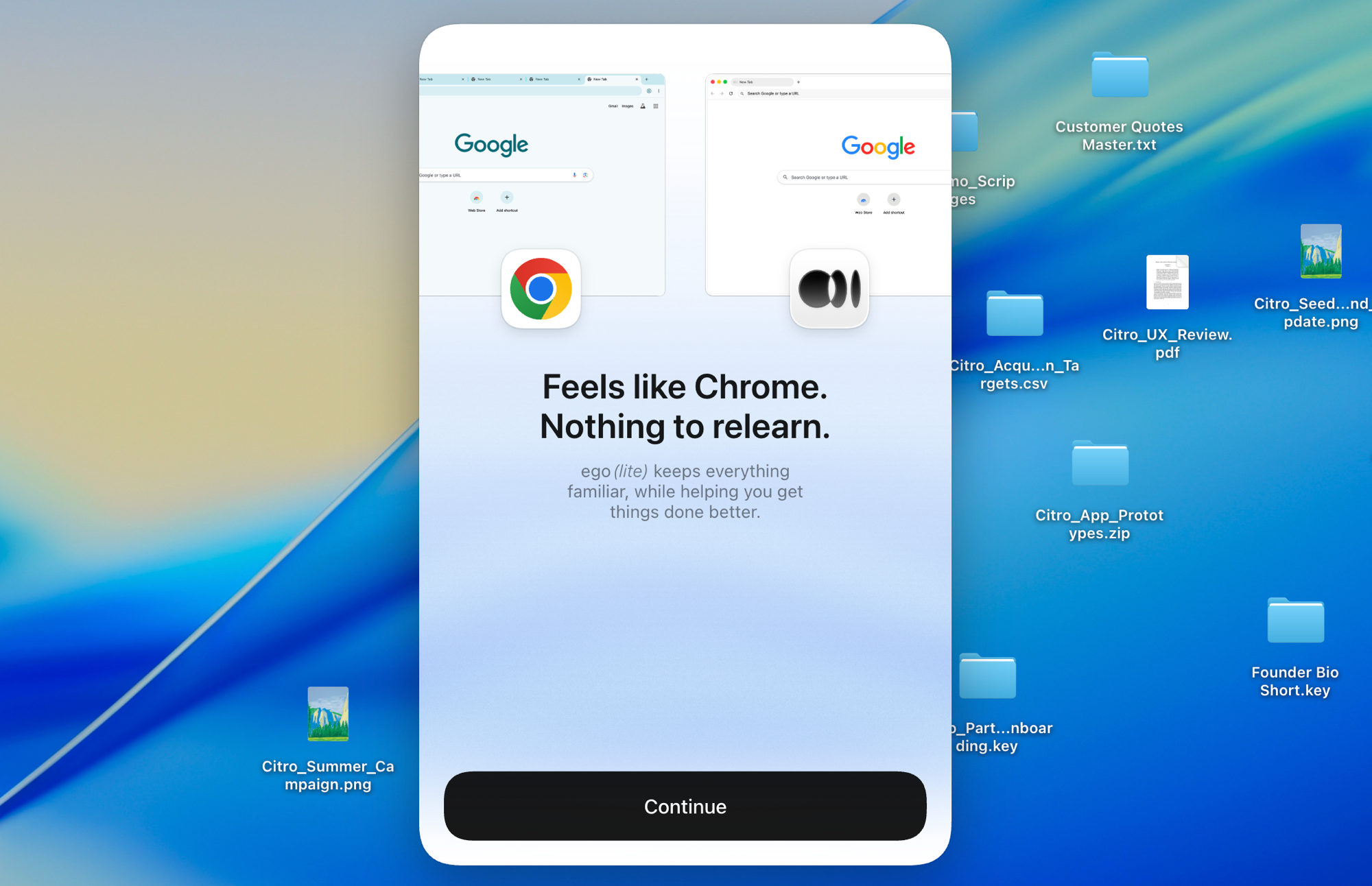
Chromium 기반인 ego lite는 클릭 한 번으로 Chrome 설정 전체를 실시간으로 가져오며, 먼저 닫아야 할 것도 없습니다. 에이전트는 막힘 없이 실제 로그인 정보를 그대로 물려받습니다.

ego lite Chrome 프로필 가져오기: 로그인 정보까지 클릭 한 번으로 설정 완료

ego lite vs Browser Harness

Feature comparison between ego lite and Browser Harness.
기능ego liteBrowser Harness
모델은 누가 제공하나요사용 중인 코딩 에이전트 (Claude Code, Codex, Cursor)직접 LLM API 키를 준비하고 토큰 단위로 비용 지불
설정앱을 설치하고 에이전트에서 /ego-browser 실행Python 프로젝트, pip install, 모델 설정, 작업 코드
로그인이 필요한 사이트 (SSO, 2FA)클릭 한 번으로 Chrome 프로필 가져오기, 기본적으로 로그인 상태 유지직접 실행한 Chromium, 프로필 재사용은 수동이며 제약 있음
동작이 실행되는 방식한 턴에 여러 동작을 JavaScript로 배치 처리에이전트 루프가 매 단계마다 모델 호출
작업당 토큰 비용더 낮음: Snapshot 입력과 배치 동작을 합쳐 작업 단위로 측정더 높음: 매 단계마다 모델을 통해 페이지 상태를 다시 전송
Browser automation on live sites (31 tasks, same model)96.8% perfect, $1.98 per completed task, 30.3 round trips83.9% perfect, $3.04 per completed task, 51.2 round trips
병렬 작업하나의 화면에 보이는 브라우저 안에서 Space가 작업을 격리실험적 기능, 여러 에이전트 인스턴스 또는 유료 클라우드 필요
일상적으로 쓰는 브라우저 역할도 겸함가능, 사용자는 자신의 Space에서 브라우징하고 에이전트는 각자의 Space에서 작업불가능, 자동화 라이브러리와 호스팅 브라우저일 뿐
재사용 가능한 스킬 (출시 예정)성공한 실행을 재사용 가능한 스킬로 압축하며, 에이전트가 이를 반복할수록 복잡한 작업에서 최대 5배 빠름 (제한적 베타)내장된 대응 기능 없음
가격무료, 구독 없음오픈소스는 무료, 클라우드와 LLM 사용은 유료
마지막 업데이트 2026년 8월 20일

매끄럽게 전환해 보세요

If you set up Browser Harness to automate your own browsing (research, form filling, logged-in chores) rather than to ship a product, the switch removes the whole project layer.

  1. ego (lite) 다운로드

    Download ego lite and import your Chrome profile in one click. The logins you were configuring Browser Harness to reach come along automatically.

  2. /ego-browser로 첫 작업을 실행해보세요

    에이전트에 붙여넣기

    /ego-browser ego.app에 접속해 대기 명단에 등록하세요

    Claude Code, Codex, Cursor에서 /ego-browser를 실행하세요. Python 환경도, 모델 선택도, API 키도 필요 없습니다.

  3. 작동하는 모습을 확인하세요
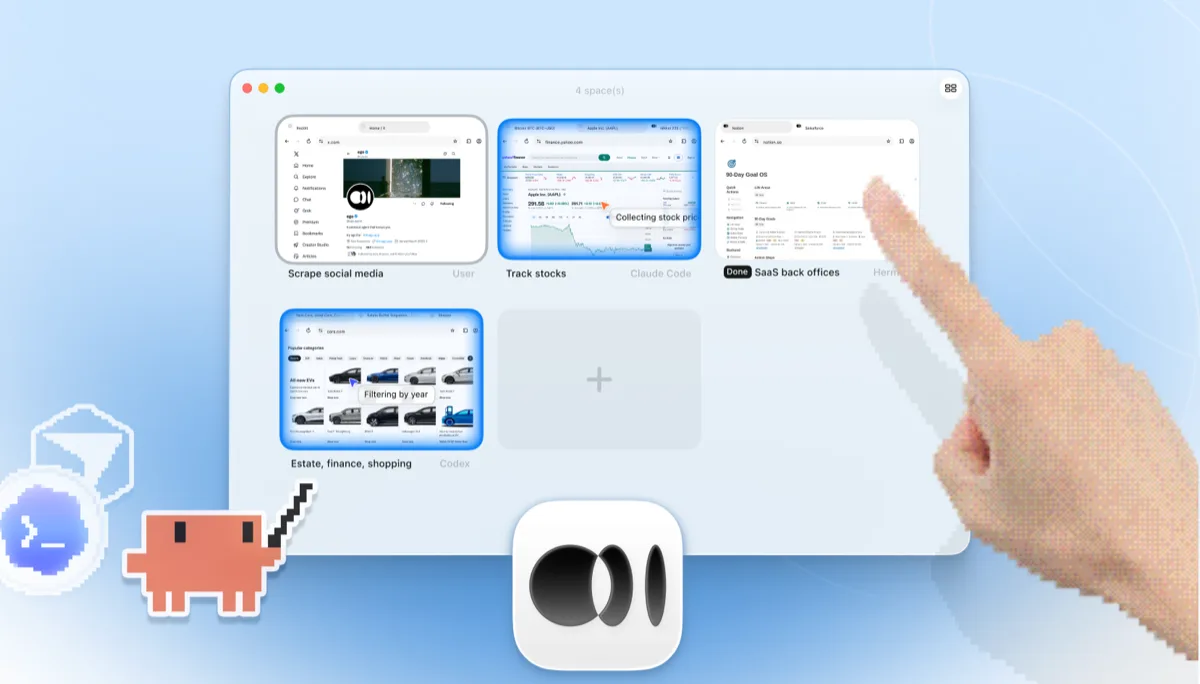
    네 개의 브라우저 작업이 나란히 실행되는 ego lite Spaces 개요: Yahoo Finance에서 Apple 주가를 추적하는 Claude Code, cars.com에서 연식별로 차량을 필터링하는 Codex, SaaS 백오피스 작업을 마무리하는 Hermes, X를 스크래핑하는 사용자, 그리고 손가락으로 +를 눌러 새 Space를 여는 모습

    작업은 로그로만 짐작해야 하는 headless Chromium 인스턴스가 아니라, 독립된 Space 안에서 실행됩니다. 실시간으로 지켜보거나 언제든 직접 넘겨받을 수 있고, 결과는 다시 에이전트의 CLI로 돌아옵니다.

Keep Browser Harness where it belongs: inside Python products and pipelines you're building for others. ego lite covers the agent browsing you do yourself.

각 도구를 언제 사용해야 할까요

ego (lite)를 선택해야 할 때

  • Python으로 아무것도 만들지 않고, 에이전트가 자신의 브라우저 작업(리서치, 양식 작성, 로그인이 필요한 잡무)을 대신 해주길 원할 때
  • 이미 Claude Code, Codex, Cursor를 사용 중이고, 별도의 API 키 비용이 드는 두 번째 에이전트 루프를 원하지 않을 때
  • 작업에 실제 로그인 정보가 필요할 때: 클릭 한 번으로 하는 프로필 가져오기가 수동 Chromium 프로필 설정보다 낫습니다.
  • 지켜보거나 넘겨받을 수 있는, 화면이 보이는 브라우저에서 여러 Space가 병렬로 작업을 실행하길 원할 때

Choose Browser Harness when

  • You're building a custom automation product or pipeline in Python. Browser Harness is a library designed to be embedded.
  • 직접 작성한 코드로 에이전트 루프를 소유하고 싶을 때: 모델을 고르고, 프롬프트를 다듬고, 각 단계를 직접 제어합니다.
  • You need automations deployed to the cloud, running on Browser Use's hosted browsers when your laptop is closed.
  • 브라우저 자동화를 다른 사람들에게 제품으로 제공하고 있을 때. ego lite는 SDK가 아니라 최종 사용자용 브라우저입니다.

AI 에이전트에게 진짜 브라우저를 선사하세요

무료이며 Mac에서 실행되고, 클릭 한 번으로 Chrome 프로필을 가져옵니다. Claude Code, Codex, Cursor 등 코드를 작성하는 모든 CLI 에이전트와 함께 사용할 수 있습니다.

Still weighing your options? See how Browser Harness compares with the other tools in the same space.

자주 묻는 질문

Browser Harness is Browser Use's local version. Browser Use is one of the most popular open-source AI browser agent projects: an MIT-licensed Python agent loop that lets an LLM control a browser, launching its own Chromium over the DevTools protocol and deciding actions step by step against the page state. You bring your own model API key and run it on your own machine. Browser Use's paid cloud product runs hosted browser agents with stealth and captcha-solving features, which is a different category from a local browser, so this page compares the harness: local against local. For developers building custom automation products and pipelines in Python, it's a strong, actively developed foundation, and of the five local tools we measured it posted the best completion rate of any competitor.

If you want an agent to do browser work for you, yes. ego lite plugs your existing coding agent into your real logged-in browser with no Python project and no API-key billing, and across 31 live-site jobs it finished 96.8% of tasks perfectly to Browser Harness's 83.9%, at $1.98 per completed task against $3.04. If you're building a browser-automation product or pipeline in Python, Browser Use is the better fit: it's a library designed to be embedded, and ego lite isn't an SDK.

Browser Use is the project; Browser Harness is its local version, the open-source Python agent loop you run on your own machine with your own LLM API key. Browser Use also sells a cloud product that runs hosted browser agents on their infrastructure. ego lite is a local browser, so the apples-to-apples comparison on this page is against Browser Harness; if you're weighing hosted browser infrastructure, see our Browserbase page instead.

We ran both tools on the same 31 browser automation tasks on live websites, driven by the same pi agent with the same model (gpt-5.6-sol, thinking effort max) and graded by the same written checklist. Each tool keeps its better of two full runs, so a failed task still counts. ego lite finished 30 of 31 tasks perfectly (96.8%) at $1.98 per completed task on 30.3 model turns; Browser Harness finished 26 of 31 (83.9%) at $3.04 on 51.2 turns, the best completion rate of any competitor measured. Browser Use's hosted cloud product was not part of the run; the comparison is local against local. The tasks, the checklists, and the raw results are open source in the ego-browser-benchmark-framework repository on GitHub, so every number can be audited or reproduced.

Browser Harness can, with manual configuration, and it's a common source of friction. The --profile flag copies your live Chrome profile into a temp directory, and on Windows that copy fails outright while Chrome is running and holding file locks, so the workaround is closing Chrome first. Connecting to an already-running Chrome over CDP works too, but Chrome 136 and later blocks CDP on your default profile, so most setups end up on a separate, non-default one. In ego lite, the real profile is the starting point: one-click import of logins, cookies, sessions, and extensions, shared safely with your own browsing through separate Spaces.

필요 없습니다. 별도로 비용을 지불해야 할 모델 루프가 없습니다. 지능은 Claude Code, Codex, Cursor, Gemini CLI, OpenCode 등 이미 사용 중인 코딩 에이전트에서 나옵니다. ego lite 자체는 구독 없이 무료입니다.

둘 다 LLM 기반 브라우징을 위한 오픈소스 도구지만, Browser Use는 자율 루프를 중심으로 만들어진 Python 에이전트 프레임워크이고, Stagehand는 코드와 AI를 결합한 하이브리드 자동화를 위해 act/extract/observe 기본 요소를 제공하는 Browserbase의 TypeScript 우선 SDK입니다. 둘 다 코드 중심이라, 프로젝트를 구성하고 모델 접근 권한을 직접 제공해야 합니다. 이 비교의 다른 한쪽은 저희 ego lite vs Stagehand 페이지에서 확인하세요.

이 둘은 서로 다른 레이어를 해결합니다. Browser Use는 에이전트 프레임워크이고, Browserbase는 그 프레임워크가 실행되는 클라우드 브라우저 인프라입니다. 많은 팀들이 프로덕션 규모를 위해 에이전트 라이브러리와 호스팅 브라우저를 함께 조합해서 쓰는데, 클라우드 규모 운영에는 실제로 효과적인 조합입니다. ego lite는 이 두 레이어 어디에도 속하지 않습니다. 자신의 계정으로 자신의 기기에서 하는 에이전트 작업을 위한, 화면이 보이는 로컬 브라우저입니다.

Browser Harness's agent loop calls the model at every step, and each call carries a fresh serialized snapshot of the page just to plan the next batch of clicks. Users running recurring or long-horizon tasks have asked the maintainers how to cut that cost, since the same task run the same way still pays full model price every time. On those 31 jobs that loop averaged 51.2 model round trips per task, the most of the five tools measured, against ego lite's 30.3. ego lite reduces the round trips themselves: the agent batches several actions in one JavaScript execution and reads pages as compressed Snapshots, so the savings compound over a whole task.

에이전트를 브라우저에 연결하는 ego-browser 셸은 MIT 라이선스 오픈소스입니다. ego lite 브라우저 자체는 macOS용 무료 앱으로, 구독이 필요 없고 데이터는 로컬에 그대로 남습니다.