





ego (lite) — это просто браузер, а ego — ваш личный агент на всех устройствах.
Записаться в лист ожидания
ego lite vs Browser Harness

The Best Browser Harness Alternative

Browser Harness is Browser Use's local version: a Python agent loop you run on your own machine with your own LLM API key, launching its own browser and calling the model again at every step to plan the next move.

ego lite needs no framework: the coding agent you already run drives your real, logged-in browser directly, batching actions instead of narrating them one at a time. Across 31 live-site jobs it finishes 96.8% of tasks with a perfect score to Browser Harness's 83.9%, on 41% fewer model round trips.

Нам доверяют разработчики из
GoogleAmazonShopifyTikTokHarvardStanfordUSCUCLA

Browser automation benchmark: ego lite vs Browser Harness

This is live browser automation, not a sandbox demo. ego lite and Browser Harness, Browser Use's local version, ran the same 31 multi-step tasks on real websites: several pages, several decisions, often a login you already have. The hosted cloud product was not part of this run. Local against local, same jobs, scored the same way.

agent: pimodel: ChatGPT 5.6 Solthinking: max31 tasks

Task completion rate

How often the agent finished the job. Stuck at login, skipped a step, or returned the wrong result: that task is a fail. Higher is better.

ego lite96.8%30 of 31 tasks perfect
Browser Harness (Browser Use local version)83.9%26 of 31 tasks perfect

Cost per completed task

What one finished job costs in model spend. Failures still get billed, so they push this number up. Lower is better.

ego lite$1.98
Browser Harness (Browser Use local version)$3.04

Model turns per task

How many times the model had to look at the page and choose the next action. Extra looks mean extra tokens, extra waiting, and extra places to stall. Lower is better.

ego lite30.3
Browser Harness (Browser Use local version)51.2

Average task time

How long a job took from start to finish, on average, including time spent waiting on the model. Lower is better.

ego lite8m 38s
Browser Harness (Browser Use local version)9m 58s

We ran every tool twice and kept the better score. A failed task still counts against it.

Check the numbers, or rerun the tasks yourselfThe 31 tasks, the grading checklists, and the raw results are open source. If a number looks off, open the repo.ego-browser-benchmark-framework

Why ego lite is better than Browser Harness

With Browser Harness, the browser agent is something you build: a Python project, an LLM API key, a loop that calls the model every step. With ego lite, it's something you already have. Run /ego-browser inside Claude Code, Codex, or Cursor and your agent gets your actual browser, logins and all. (Browser Use's hosted cloud product is a different category; the local-versus-local matchup is this page.)

96.8% of tasks done perfectly. No other tool tops 84%.

Browser Harness's agent loop calls the LLM at every step: read the page, decide the next batch of actions, wait, repeat. It turned in the most careful runs of any competitor on those 31 jobs, and paid for the care in round trips: 51.2 model calls per task, the most of the five tools measured, each one re-sending page state just to plan the next few clicks.

In ego lite, every page reaches your agent as a compressed Snapshot it can act on immediately, several actions per JavaScript turn, no separate model loop deciding a step at a time. The result on the same 31 tasks: 96.8% perfect to Browser Harness's 83.9%, on 41% fewer round trips and 35% less model spend per completed task.

Time to finish a task, shorter is better
518 sego (lite)
598 sbrowser harness
Data source - Task: finish an average live-site job
Параллельная многозадачность, более быстрое выполнение

Browser Use's own docs mark parallel Browser Harness runs experimental: developers note agents can conflict when they share resources, and real isolation means standing up a separate browser instance per task yourself.

В ego lite нет ограничения на количество Spaces: каждый выполняет свою задачу одновременно, в собственном импортированном профиле Chrome. Ни один из них не отнимает вашу вкладку, и вы можете в любой момент наблюдать за любым Space или взять управление на себя.

Никакой беготни туда-сюда Меньше расходов на токены

Browser Harness's loop calls the model at every step and carries the page state along, and on longer tasks that cost compounds fast enough that users ask the Browser Use maintainers how to avoid burning tokens on a task that runs the same way every time.

Ваш агент в ego lite группирует несколько действий в несколько строк JavaScript за один ход вместо того, чтобы ждать нового вызова модели, чтобы продолжить. В сочетании со вводом через Snapshot та же задача выполняется на существенно меньшем количестве токенов в целом.

Claude Code · ego lite
>/ego-browser Add the first product to the cart, then check checkout loads
Bash(
ego-browser nodejs <<'EOF' await openOrReuseTab('localhost:3000') await click('.product-card') await click('.add-to-cart') await click('a[href="/checkout"]') cliLog('checkout loaded') EOF
)
Output:
[t=4480ms] checkout loaded
Done. Both steps work.
─── 1 tool call · 1.1k tokens ───
Browser Harness · agent.run()
>$ python run_task.py 🎯 Task: Add the first product to the cart, then check checkout loads
📍 Step 1:
👍 Eval: Page loaded successfully
🧠 Memory: On demo store homepage, need to find a product
🎯 Next goal: Open first product and add it to cart
📍 Step 1: Ran 3 actions in 2.1s: ✅ 3
3.4k tokens sent so far
📍 Step 2:
👍 Eval: Product added to cart
🧠 Memory: Item in cart, now check checkout
🎯 Next goal: Navigate to checkout and confirm it loads
📍 Step 2: Ran 2 actions in 1.9s: ✅ 2
7.1k tokens sent so far
📍 Step 3:
👍 Eval: Checkout page did not load on first click
🧠 Memory: Link required a second click, retrying
🎯 Next goal: Retry the checkout link and wait for the form
📍 Step 3: Ran 1 action in 2.3s: ✅ 1
10.8k tokens sent so far
📍 Step 4:
👍 Eval: Payment form is present
🧠 Memory: Task complete
🎯 Next goal: done
📍 Step 4: Ran 1 action in 1.4s: ✅ 1
13.6k tokens sent so far
─── 4 model calls · 13.6k tokens ───
The same task, the same model. Left: one batched JavaScript call in ego lite, 1.1k tokens total. Right: Browser Harness's agent loop, a fresh model call per step, tokens climb to 13.6k.

Тот же Chrome, нативно для агентов

Browser Harness launches its own Chromium over the DevTools protocol, and the Browser Use GitHub issues are full of developers hitting profile-lock errors pointing it at their real Chrome: the --profile flag copies the live profile into a temp directory, and on Windows that copy fails outright while Chrome holds the file locks.

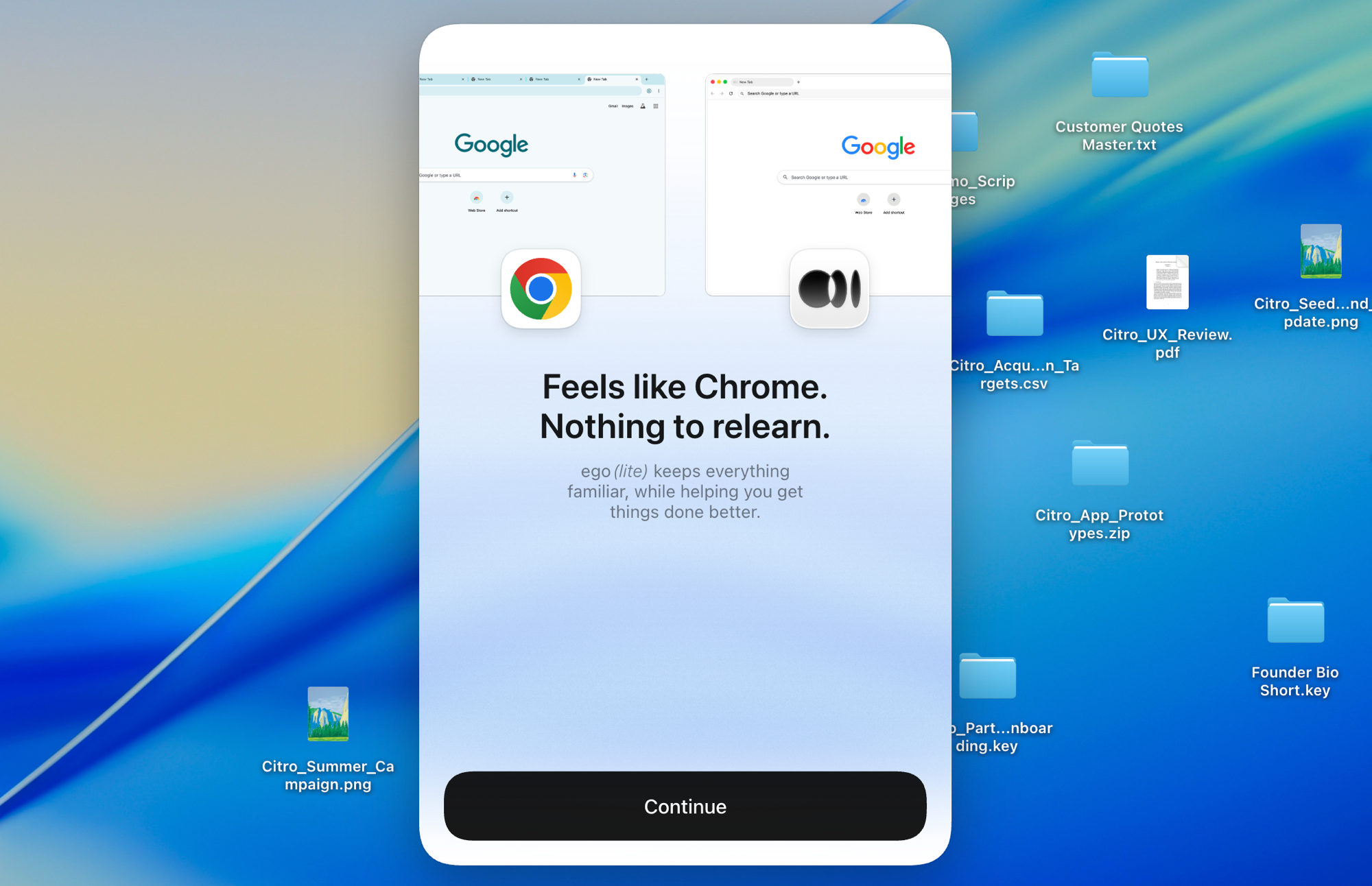
Построенный на Chromium, ego lite импортирует всю вашу настройку Chrome в один клик, вживую, ничего не нужно закрывать заранее. Ваши агенты наследуют настоящие логины и никогда не застревают.

Импорт профиля Chrome в ego lite: настройка в один клик со всеми вашими логинами

ego lite vs Browser Harness

Feature comparison between ego lite and Browser Harness.
Функцияego liteBrowser Harness
Кто предоставляет модельВаш агент для написания кода (Claude Code, Codex, Cursor)Вы, предоставляете ключ API LLM и платите за каждый токен
НастройкаУстановите приложение, запустите /ego-browser в вашем агентеПроект на Python, pip install, конфигурация модели, код задачи
Сайты с активными сессиями (SSO, 2FA)Импорт профиля Chrome в один клик, вход выполнен по умолчаниюЗапущенный Chromium; повторное использование профиля вручную, с оговорками
Как выполняются действияНесколько действий группируются за один ход в JavaScriptЦикл агента вызывает модель на каждом шаге
Расход токенов на задачуНиже: ввод через Snapshot плюс группировка действий, измеряется по всей задачеВыше: на каждом шаге состояние страницы заново отправляется через модель
Browser automation on live sites (31 tasks, same model)96.8% perfect, $1.98 per completed task, 30.3 round trips83.9% perfect, $3.04 per completed task, 51.2 round trips
Параллельные задачиSpaces изолируют задачи внутри одного видимого браузераЭкспериментально; несколько экземпляров агента или платное облако
Одновременно служит вашим повседневным браузеромДа, вы работаете в своём Space, а агенты работают в своихНет, это библиотека для автоматизации и размещённые браузеры
Многоразовые навыки (скоро)Превращает успешные запуски в многоразовые навыки; до 5 раз быстрее на сложных задачах по мере их повторения агентом (ограниченная бета)Нет встроенного аналога
ЦенаБесплатно, без подпискиОткрытый исходный код бесплатен; облако и использование LLM платные
Последнее обновление 20 авг. 2026 г.

Сделайте переход незаметным

If you set up Browser Harness to automate your own browsing (research, form filling, logged-in chores) rather than to ship a product, the switch removes the whole project layer.

  1. Скачать ego (lite)

    Download ego lite and import your Chrome profile in one click. The logins you were configuring Browser Harness to reach come along automatically.

  2. Запустите свою первую задачу с /ego-browser

    Вставьте в своего агента

    /ego-browser Откройте ego.app и запишитесь в лист ожидания

    Запустите /ego-browser в Claude Code, Codex или Cursor. Никакого окружения Python, никакого выбора модели, никакого ключа API.

  3. Посмотрите, как это работает
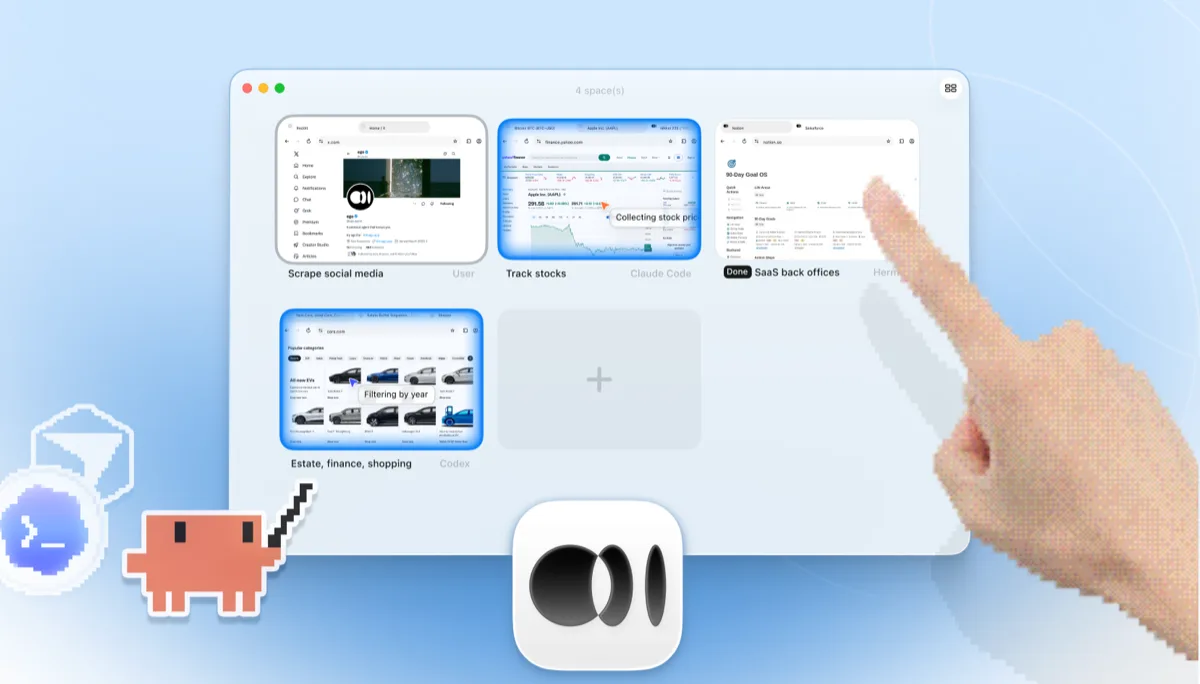
    Обзор Spaces в ego lite с четырьмя браузерными задачами, выполняющимися бок о бок: Claude Code отслеживает акции Apple на Yahoo Finance, Codex фильтрует автомобили по году на cars.com, Hermes завершает офисную задачу SaaS, пользователь собирает данные с X, и рука нажимает + для открытия ещё одного Space

    Задача выполняется в собственном Space, а не в headless-экземпляре Chromium, о котором можно только догадываться по логам. Наблюдайте за ней вживую или возьмите управление в любой момент, а результат вернётся прямо в CLI вашего агента.

Keep Browser Harness where it belongs: inside Python products and pipelines you're building for others. ego lite covers the agent browsing you do yourself.

Когда использовать каждый инструмент

Выбирайте ego (lite), если

  • Вы хотите, чтобы агент выполнял вашу браузерную работу (исследования, формы, рутинные задачи в аккаунтах с активной сессией), не создавая ничего на Python.
  • Вы уже используете Claude Code, Codex или Cursor и не хотите второй цикл агента с собственным счётом за API-ключ.
  • Задачам нужны ваши настоящие логины: импорт профиля в один клик лучше ручной настройки профиля Chromium.
  • Вы хотите, чтобы задачи выполнялись параллельно в Spaces, в обычном (не headless) браузере, за которым можно наблюдать или взять управление.

Choose Browser Harness when

  • You're building a custom automation product or pipeline in Python. Browser Harness is a library designed to be embedded.
  • Вы хотите сами управлять циклом агента в своём коде: выбирать модель, формировать промпты, контролировать каждый шаг.
  • You need automations deployed to the cloud, running on Browser Use's hosted browsers when your laptop is closed.
  • Вы поставляете автоматизацию браузера другим людям. ego lite - это браузер для конечного пользователя, а не SDK.

Дайте своему агенту настоящий браузер

Бесплатно, работает на вашем Mac, импортирует профиль Chrome в один клик. Работает с Claude Code, Codex, Cursor и любым CLI-агентом, который пишет код.

Still weighing your options? See how Browser Harness compares with the other tools in the same space.

Частые вопросы

Browser Harness is Browser Use's local version. Browser Use is one of the most popular open-source AI browser agent projects: an MIT-licensed Python agent loop that lets an LLM control a browser, launching its own Chromium over the DevTools protocol and deciding actions step by step against the page state. You bring your own model API key and run it on your own machine. Browser Use's paid cloud product runs hosted browser agents with stealth and captcha-solving features, which is a different category from a local browser, so this page compares the harness: local against local. For developers building custom automation products and pipelines in Python, it's a strong, actively developed foundation, and of the five local tools we measured it posted the best completion rate of any competitor.

If you want an agent to do browser work for you, yes. ego lite plugs your existing coding agent into your real logged-in browser with no Python project and no API-key billing, and across 31 live-site jobs it finished 96.8% of tasks perfectly to Browser Harness's 83.9%, at $1.98 per completed task against $3.04. If you're building a browser-automation product or pipeline in Python, Browser Use is the better fit: it's a library designed to be embedded, and ego lite isn't an SDK.

Browser Use is the project; Browser Harness is its local version, the open-source Python agent loop you run on your own machine with your own LLM API key. Browser Use also sells a cloud product that runs hosted browser agents on their infrastructure. ego lite is a local browser, so the apples-to-apples comparison on this page is against Browser Harness; if you're weighing hosted browser infrastructure, see our Browserbase page instead.

We ran both tools on the same 31 browser automation tasks on live websites, driven by the same pi agent with the same model (gpt-5.6-sol, thinking effort max) and graded by the same written checklist. Each tool keeps its better of two full runs, so a failed task still counts. ego lite finished 30 of 31 tasks perfectly (96.8%) at $1.98 per completed task on 30.3 model turns; Browser Harness finished 26 of 31 (83.9%) at $3.04 on 51.2 turns, the best completion rate of any competitor measured. Browser Use's hosted cloud product was not part of the run; the comparison is local against local. The tasks, the checklists, and the raw results are open source in the ego-browser-benchmark-framework repository on GitHub, so every number can be audited or reproduced.

Browser Harness can, with manual configuration, and it's a common source of friction. The --profile flag copies your live Chrome profile into a temp directory, and on Windows that copy fails outright while Chrome is running and holding file locks, so the workaround is closing Chrome first. Connecting to an already-running Chrome over CDP works too, but Chrome 136 and later blocks CDP on your default profile, so most setups end up on a separate, non-default one. In ego lite, the real profile is the starting point: one-click import of logins, cookies, sessions, and extensions, shared safely with your own browsing through separate Spaces.

Нет. Отдельный цикл модели, который нужно оплачивать, отсутствует. Интеллект обеспечивается агентом для написания кода, который вы уже используете, будь то Claude Code, Codex, Cursor, Gemini CLI или OpenCode. Сам ego lite бесплатен, без подписки.

Оба - инструменты с открытым исходным кодом для браузинга на основе LLM, но Browser Use - это Python-фреймворк для агентов, построенный вокруг автономного цикла, а Stagehand - это SDK от Browserbase, ориентированный на TypeScript, с примитивами act/extract/observe для гибридной автоматизации на основе кода и ИИ. Оба ориентированы на код: вы разворачиваете проект и предоставляете доступ к модели. Подробнее об этом сравнении смотрите на нашей странице ego lite против Stagehand.

Они решают задачи на разных уровнях. Browser Use - это фреймворк для агентов; Browserbase - это облачная инфраструктура браузеров, на которой работают фреймворки. Команды часто сочетают библиотеку агента с размещёнными браузерами для продакшен-масштаба, и это реальное преимущество для облачных флотов. ego lite не относится ни к одному из этих уровней: это локальный, обычный (не headless) браузер для работы агента, которую вы выполняете на своей машине, со своими аккаунтами.

Browser Harness's agent loop calls the model at every step, and each call carries a fresh serialized snapshot of the page just to plan the next batch of clicks. Users running recurring or long-horizon tasks have asked the maintainers how to cut that cost, since the same task run the same way still pays full model price every time. On those 31 jobs that loop averaged 51.2 model round trips per task, the most of the five tools measured, against ego lite's 30.3. ego lite reduces the round trips themselves: the agent batches several actions in one JavaScript execution and reads pages as compressed Snapshots, so the savings compound over a whole task.

Оболочка ego-browser, которая подключает агентов к браузеру, распространяется как открытый исходный код под лицензией MIT. Сам браузер ego lite - это бесплатное приложение для macOS, без подписки, и ваши данные остаются локальными.