





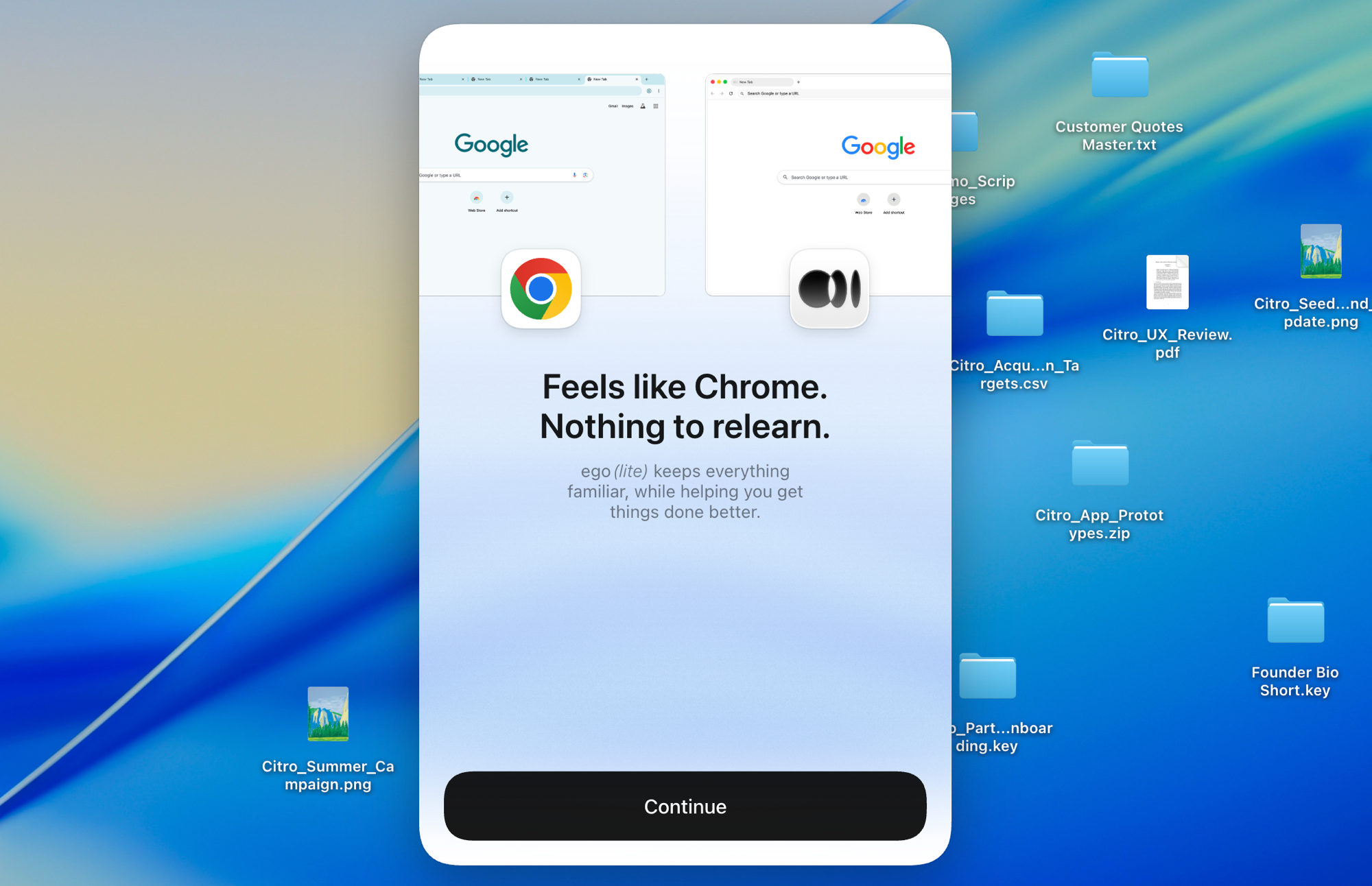
ego (lite) 只是一個瀏覽器,ego 則是你跨裝置的個人 Agent。
加入候補名單
ego lite 對比 Playwright

最好的 Playwright 替代方案

Playwright 是微軟推出的腳本優先自動化框架:你要針對瀏覽器情境(browser context)寫 TypeScript 或 Python,設定好 locator,然後每次網站一改版,就得回頭修一次。

ego lite skips the script. Your agent reads the page as a compressed Snapshot and writes its own JavaScript, already signed into your real Chrome. Across 31 live browser automation jobs it finishes 96.8% of tasks with a perfect score; agent-driven Playwright finishes 71%.

獲得來自以下單位開發者的信賴
GoogleAmazonShopifyTikTokHarvardStanfordUSCUCLA

Browser automation benchmark: ego lite vs Playwright

This is agent-driven browser automation on live websites, not a scripted test suite you commit to CI. ego lite and Playwright ran the same 31 multi-step tasks end to end: several pages, several decisions, many behind a login. A locator recorded last month often dies on those pages. Both ran the identical set, so the bars below compare the same jobs.

agent: pimodel: ChatGPT 5.6 Solthinking: max31 tasks

Task completion rate

How often the agent finished the job. Stuck at login, skipped a step, or returned the wrong result: that task is a fail. Higher is better.

ego lite96.8%30 of 31 tasks perfect
playwright-cli71.0%22 of 31 tasks perfect

Cost per completed task

What one finished job costs in model spend. Failures still get billed, so they push this number up. Lower is better.

ego lite$1.98
playwright-cli$4.61

Model turns per task

How many times the model had to look at the page and choose the next action. Extra looks mean extra tokens, extra waiting, and extra places to stall. Lower is better.

ego lite30.3
playwright-cli42.8

Average task time

How long a job took from start to finish, on average, including time spent waiting on the model. Lower is better.

ego lite8m 38s
playwright-cli11m 33s

We ran every tool twice and kept the better score. A failed task still counts against it.

Playwright ran through playwright-cli, the CLI Microsoft ships for coding agents. Not a saved test script.

Check the numbers, or rerun the tasks yourselfThe 31 tasks, the grading checklists, and the raw results are open source. If a number looks off, open the repo.ego-browser-benchmark-framework

為什麼 ego lite 比 Playwright 更好

Playwright 靠實力贏得現代測試框架的地位,對於在 CI 裡跑固定、確定性的端對端(end-to-end)測試套件,它依然是最難超越的工具。但當任務是互動性的:抓這個儀表板的資料、報那筆費用、午餐前檢查三條流程,寫腳本反而變成負擔。ego lite 透過開源的 ego-browser 外殼,把這類任務直接交給你原本就在用的程式 Agent 處理。

96.8% of tasks done perfectly. No other tool tops 84%.

A Playwright script survives about as long as the page it was recorded against. Codegen locators capture one DOM snapshot, and a redesign a few months later leaves you patching selectors instead of shipping. Even driven by an agent through Microsoft's own playwright-cli, 29% of those 31 live-site tasks ended short of a perfect score.

In ego lite, your agent reads the page as a compressed Snapshot with stable @N refs and writes the JavaScript itself, so it adapts when the page changes instead of breaking: 96.8% of the same 31 tasks ended perfect, at the fastest average task time of the five tools measured.

Time to finish a task, shorter is better
518 sego (lite)
693 splaywright-cli
Data source - Task: finish an average live-site job
平行多工,執行更快

Playwright 的平行測試預設是無頭(headless)模式執行。開啟有介面(headed)模式的話,每個 worker 都會各自跳出一個作業系統視窗,而且沒辦法暫停某一個接手操作,所以大部分團隊還是選擇無頭執行,事後再看 trace 檔案。

在 ego lite 裡,你能開的 Space 數量沒有上限:每個 Space 都在自己匯入的 Chrome 個人資料(profile)裡同時執行各自的任務,彼此不會搶走你正在使用的分頁。你隨時都能即時觀看或接手任何一個 Space。

不再來回往返 消耗更少 tokens

透過微軟自家的 playwright-cli 讓 Agent 操作 Playwright,你還是得一個動作發一道指令:先 snapshot,點一個 ref,再 snapshot 一次,讀結果,然後決定下一道指令。

在 ego lite 裡,Agent 每一輪會把好幾個動作打包成一次 JavaScript 呼叫,讀取的也是壓縮過的 Snapshot,而不是完整的無障礙資訊傾印(accessibility dump)。兩者疊加起來,整個任務用掉的 token 總量會大幅減少。

Claude Code · ego lite
>/ego-browser Add the first product to the cart, then check checkout loads
Bash(
ego-browser nodejs <<'EOF' await openOrReuseTab('localhost:3000') await click('.product-card') await click('.add-to-cart') await click('a[href="/checkout"]') cliLog('checkout loaded') EOF
)
Output:
[t=4480ms] checkout loaded
Done. Both steps work.
─── 1 tool call · 1.1k tokens ───
Claude Code · playwright-cli
>Add the first product to the cart, then check checkout loads
$playwright-cli open localhost:3000
stdout
Opened http://localhost:3000
1.6k tokens sent so far
Storefront loaded. Snapshotting to find the first product.
$playwright-cli snapshot
Snapshot
… +224 lines (ctrl+o to expand)
3.1k tokens sent so far
First product card is e12. Clicking it.
$playwright-cli click e12
stdout
Clicked e12
4.9k tokens sent so far
Product page is up, refs are stale. Snapshotting again.
$playwright-cli snapshot
Snapshot
… +205 lines (ctrl+o to expand)
6.8k tokens sent so far
Add to cart button is e8.
$playwright-cli click e8
stdout
Clicked e8
9.2k tokens sent so far
Added. Heading to checkout.
$playwright-cli click e21
stdout
Clicked e21
11.2k tokens sent so far
Confirming the checkout page actually rendered.
$playwright-cli snapshot
Snapshot
… +229 lines (ctrl+o to expand)
13.6k tokens sent so far
─── 7 tool calls · 13.6k tokens ───
同樣的任務,同樣的模型。 左邊:ego lite 用一次批次 JavaScript 呼叫,總共 1.1k tokens。 右邊:透過 playwright-cli 操作的 Playwright,來回 7 次,token 一路攀升到 13.6k。

同一個 Chrome,AI Agent 原生體驗

全新的 Playwright context 一開始是空的,所以要處理真實登入,就得寫腳本登入、存 storageState,然後祈禱這些 token 能撐過你的測試執行。而只要服務商會輪換 refresh token(像 Auth0 在啟用 MFA 時那樣),存下來的狀態還是會失效。

ego lite 只要一個點擊,就能匯入你整個 Chrome 個人資料:cookie、session、擴充功能全部一起帶過來,Agent 一開始就已經在你所有登入的地方都保持登入狀態。

ego lite Chrome 個人檔案匯入:一鍵設定,帶著你所有登入狀態,不需要 storageState 檔案

ego lite 對比 Playwright

ego lite 與 Playwright 的功能比較。
功能ego litePlaywright
工作是怎麼完成的描述任務,你的 Agent 來操作瀏覽器撰寫並維護 TS/Python/Java/.NET 腳本
如何應對頁面變動Agent 重新讀取 Snapshot 並自行調整Locator 失效,你就要自己修改程式碼
已登入的網站(SSO、2FA)直接沿用你真實的 Chrome 個人檔案與登入狀態空白的 context,得自己寫登入腳本、管理 storageState
設定安裝應用程式,在你的 AI Agent 中執行 /ego-browserNode/Python 專案,安裝瀏覽器、設定檔
與 AI Agent 協作專為它們打造:透過 ego-browser 支援 Claude Code、Codex、Cursor透過 codegen、playwright-cli,或另外的 Playwright MCP 伺服器
Browser automation on live sites (31 tasks, same model)96.8% perfect, $1.98 per completed task, 8m 38s average71% perfect, $4.61 per completed task, 11m 33s average (via playwright-cli)
平行任務Space 在同一個可見的瀏覽器中隔離各項任務Worker 與 context,通常以無介面(headless)模式執行
日常使用的瀏覽器是的,你在自己的 Space 裡瀏覽,Agent 則在它們自己的 Space 裡工作不是,它是自動化函式庫,不是你日常會用的瀏覽器
CI 測試套件不是,是互動式 Agent 任務,不是提交進版控的測試程式碼是的,是目前最強的測試執行器(test runner)與 CI 整合方案
可重複使用的 skills(即將推出)將成功的執行過程萃取成可重複使用的 skills;隨著 AI Agent 重複執行,複雜任務最多可加快 5 倍(限量 beta)沒有內建的對應功能
價格免費,無需訂閱免費、開源
最後更新 2026年8月20日

讓轉換無縫接軌

你不需要把 Playwright 的測試搬到 ego lite,留著就好。真正該轉過來的,是你在 CI 之外一直在寫(或一直懶得寫)腳本處理的那些事:一次性、需要登入、每週都在變的瀏覽器工作。

  1. 下載 ego (lite)

    下載 ego lite,一鍵匯入你的 Chrome 個人檔案。那些你的測試 context 從來沒有的登入狀態,也會一起帶過來。

  2. 用 /ego-browser 執行你的第一個任務

    貼到你的 Agent 裡

    /ego-browser 打開 ego.app,列出導覽列裡的每一個連結

    在 Claude Code、Codex 或 Cursor 裡執行 /ego-browser,不需要專案架構,也不需要 playwright.config。

  3. 看它實際運作
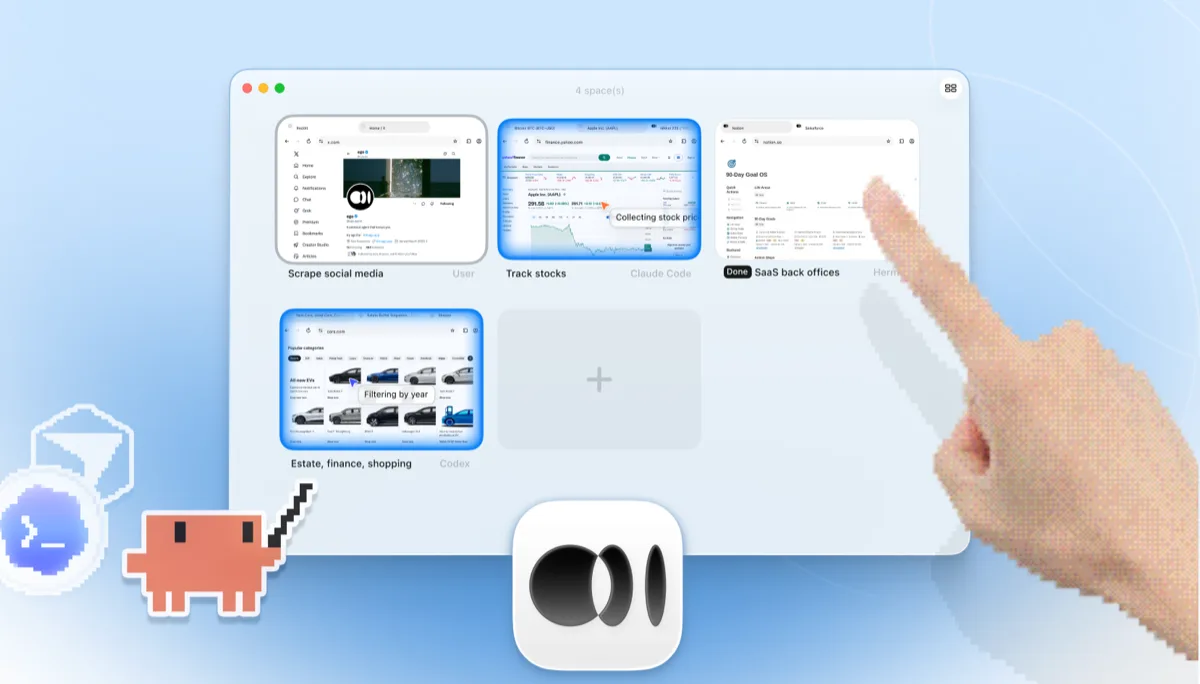
    ego lite 的 Space 總覽,四項瀏覽器任務並排執行:Claude Code 在 Yahoo Finance 追蹤蘋果股價、Codex 在 cars.com 依年份篩選車款、Hermes 完成一項 SaaS 後台任務、一位使用者在擷取 X 上的資料,還有一隻手正點擊 + 開啟另一個 Space

    把原本要寫腳本才能做的任務交給 Agent,像是從已登入的儀表板抓數字,或走一遍結帳流程,只要用一句話描述就行。

CI 裡的確定性端對端測試套件,繼續交給 Playwright。ego lite 負責的是互動式 Agent 這一塊,兩者不會互相取代。

何時該用哪個工具

適合選擇 ego (lite) 的情況

  • 這些工作都藏在你的登入狀態後面:儀表板、管理後台、SSO,寫腳本處理 storageState 根本不值得。
  • 你寧可直接把任務描述給 Claude Code、Codex 或 Cursor,也不想搭建測試專案、維護 locator。
  • 你想在多個並行的 Space 裡同時檢查好幾條流程,同時自己還能在同一個瀏覽器裡繼續瀏覽。
  • 你在意每個任務的 token 成本:Snapshot 輸入加上批次執行的 JavaScript 疊加起來,能讓整個任務的花費維持在低水位。

什麼時候該選 Playwright

  • 你要建立正式納入版控、能在 CI 中穩定重現結果的端對端測試套件。這正是 Playwright 的核心優勢。
  • 你仰賴它的測試執行器、自動等待(auto-waiting)、trace viewer 和 codegen,這些工具是多數競品仍然缺乏的。
  • 你需要涵蓋 Firefox 和 WebKit。ego lite 目前只支援 Chromium。
  • 你的團隊同時使用 TypeScript、Python、Java 或 .NET,並希望每種語言都有第一流的綁定(binding)支援。

給你的 AI Agent 一個真實瀏覽器

免費,在你的 Mac 上執行,一鍵匯入你的 Chrome 個人設定檔。適用於 Claude Code、Codex、Cursor,以及任何會寫程式碼的 CLI AI Agent。

還在比較各種選項嗎?看看 Playwright 跟同類其他工具的比較。

FAQ

Playwright 是微軟(Microsoft)推出的開源自動化框架,支援 Chromium、Firefox 和 WebKit,並為 TypeScript、Python、Java 和 .NET 提供第一流的綁定。它的測試執行器、自動等待、trace viewer 和 CI 整合,在同類工具中都是數一數二,若要建立正式、可重現結果的端對端測試套件,這就是標竿工具。微軟也開始推出 playwright-cli,這是 Playwright 團隊為 Claude Code、Copilot 等程式碼 Agent 打造的、注重 token 用量的輔助 CLI 工具。本頁討論的是核心框架本身,以及它的腳本化與 CLI 工作流程;Playwright MCP 則是另一個面向 Agent 的獨立 MCP 伺服器,有自己專屬的比較頁面。選擇 Agent 驅動路線的開發者,也常會權衡 Browser Use vs Playwright 以及 Stagehand vs Playwright,因為這三者都常出現在多數 LLM 驅動的瀏覽器操作技術堆疊中。

如果是 AI Agent 驅動的瀏覽器操作,答案是肯定的:免寫腳本、使用真實登入狀態、支援並行 Space,這讓它成為少數專門為 Agent 打造、而不是在腳本化道路上再往前一步的 Playwright 替代方案。但如果是要在 CI 中執行正式的端對端測試套件,答案是否定的。Playwright 的測試執行器、追蹤功能和跨瀏覽器覆蓋範圍確實優秀,這部分你應該繼續使用它。老實說,分工很清楚:要納入版控的測試交給 Playwright,要委派出去的任務交給 ego lite。

We ran both tools on the same 31 browser automation tasks on live websites, driven by the same pi agent with the same model (gpt-5.6-sol, thinking effort max) and graded by the same written checklist. Each tool keeps its better of two full runs. Playwright entered through playwright-cli, the companion CLI the Playwright team ships for coding agents, which is the strongest agent-facing way to run it today. ego lite finished 30 of 31 tasks perfectly (96.8%) at $1.98 per completed task; agent-driven Playwright finished 22 of 31 (71%) at $4.61. The tasks, the checklists, and the raw results are open source in the ego-browser-benchmark-framework repository on GitHub, so every number can be audited or reproduced.

這三者都是以腳本為主的框架,不管你搜尋的是 playwright vs puppeteer 還是 puppeteer vs playwright 都一樣。新的測試套件選 Playwright 最合適:執行速度最快、有自動等待、支援 TS/Python/Java/.NET,而且三種引擎都涵蓋。如果你在 Node 裡只用 Chrome,想要一個精簡的 DevTools 層級 API,Puppeteer 比較適合。如果重視 W3C WebDriver 標準、多語言綁定,或是既有的企業 Grid,Selenium 比較適合。ego lite 扮演的是不同的角色:讓 AI Agent 直接操作瀏覽器,取代寫腳本,不需要維護程式碼,而且一開始就接上你真實的登入狀態。

Selenium vs Playwright 說到底就是兩邊各有取捨。Playwright:執行速度較快、內建自動等待、擁有現代化的測試執行器,還有 trace viewer、codegen 這類工具;取捨在於生態系相對年輕。Selenium:遵循 W3C WebDriver 標準、支援最廣泛的語言和舊版瀏覽器,而且有二十年的企業採用經驗;取捨在於程式碼較冗長,需要更明確地處理等待邏輯。如果你今天要選一個測試框架,多數團隊會選 Playwright。如果工作是 Agent 驅動而不是寫腳本,可以到我們的 Selenium 頁面看看 ego lite 跟 Selenium 的比較。

Both wrap a fresh Playwright browser for agent use, and both still run one command per action in a blank profile: Playwright MCP as MCP tool calls, playwright-cli as CLI invocations. ego lite instead batches multiple actions in JavaScript per turn, reads pages as compressed Snapshots, and starts from your real logged-in Chrome profile. Across those 31 live-site jobs that difference measures out to 96.8% of tasks perfect against 71%, at $1.98 per completed task against $4.61, with playwright-cli as the Playwright entrant. Full breakdown on the ego lite vs Playwright MCP page.

只能部分做到。你可以在腳本登入後儲存 storageState,或是啟動一個指向 Chrome 設定檔目錄的持久化 context(persistent context),但 session 會過期,2FA 和 SSO 也常常打斷腳本化的登入流程,而且設定檔沒辦法跟正在執行的 Chrome 共用。ego lite 只需要匯入你的設定檔一次,之後 Agent 就會繼承真實的登入狀態。

是的。完全免費,不需訂閱,資料存在本機。你的 Agent 連接的 ego-browser 外殼是採用 MIT 授權的開源專案。